



Module 08 · Contact actions bar
GoHighLevel contact actions: the jobs your team repeats, one tap each
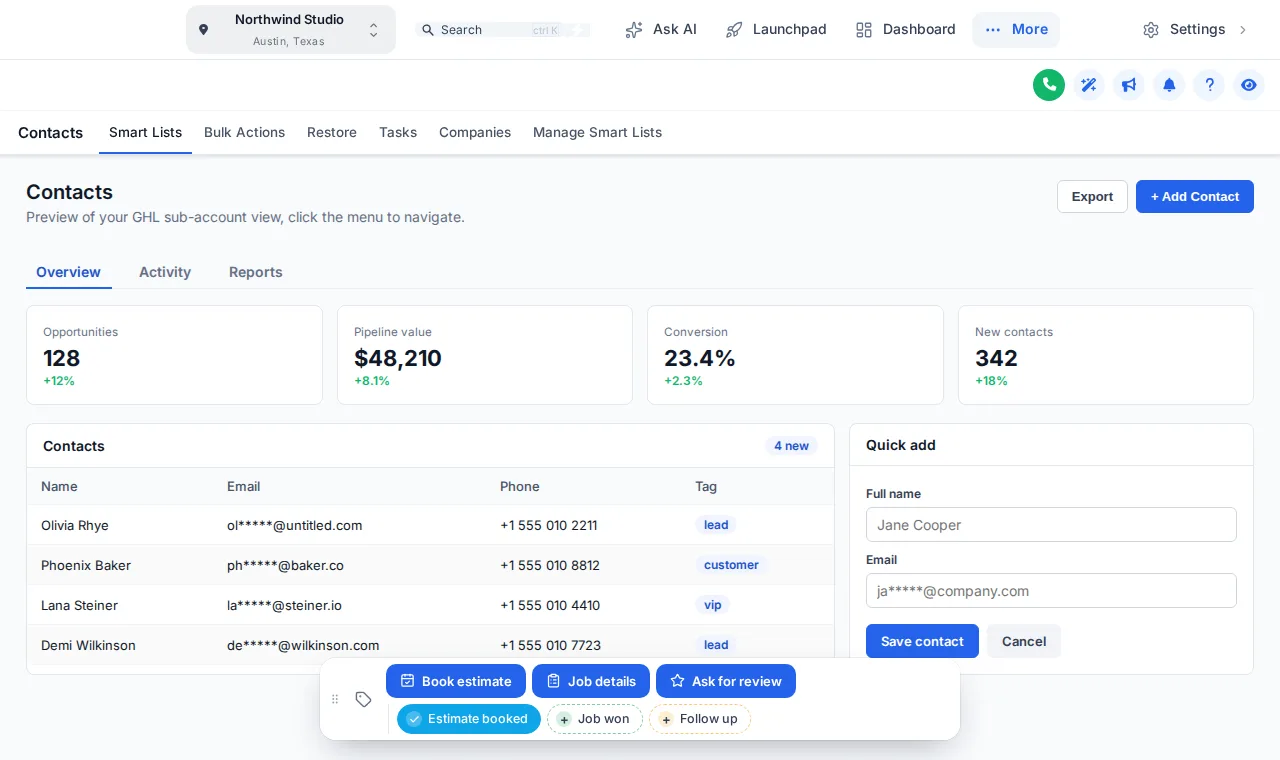
Starting a workflow should not take six clicks in the tag box. The contact actions bar puts quick tags, workflow buttons and short forms on every contact page, so the everyday jobs in a snapshot's automations become a single tap.
One-time payment, lifetime accessLogin within minutes, at most 24 hours
Olivia Rhye
Tag "estimate booked" added, so the booking workflow can start
Starting a workflow should not take six clicks
Tagging a contact means opening the tag box, typing, picking and checking you got it right. Updating a few fields means scrolling the whole record. Buttons turn those daily jobs into a tap, and the snapshot's workflows do the rest.
Stock GoHighLevel
- Open the tag box, type, pick, check the spelling
- Scroll the record to find three custom fields
- A typo in a tag means the workflow never fires
With the customizer
- One tap adds the exact tag the workflow listens for
- A short form writes straight to the custom fields
- The chip shows at a glance whether the tag is on
Try it live
Tap the tags, open the form, drag the bar
This is the real contact actions bar on a sample contact, set up the way a home-services agency running one of our snapshots might: book the estimate, record the job, ask for the review. Nothing is saved in the preview.
Loading the live preview
Buttons and tags This is the real bar. Tap a quick tag, open Job details, or drag the bar by its grip. Nothing is saved in the preview; inside GoHighLevel the contact updates at once.
Buttons that fit the snapshot you installed
The buttons are only as good as the workflows behind them, which is why they pair so well with a snapshot that ships those workflows ready.
- 01
HVAC, plumbing and roofing
Estimate booked, Job won and Ask for review as chips; a Job details form for job value, install date and service type.
The HVAC snapshot - 02
Dental and medical practices
New patient, Recall due and Send forms as buttons, each starting the matching reminder workflow without front-desk typing.
The dental snapshot - 03
Real estate agents
Hot buyer, Showing booked and Under contract chips, plus a form for budget and preferred area.
The real estate snapshot - 04
Law firms
Consult booked, Retainer sent and Conflict check chips that kick off the intake automations in order.
The law firm snapshot
Everything the bar can do
Quick tags
One-tap chips for your most used tags, showing whether the contact has each one. Tap again to remove.
Workflow buttons
Add, remove or toggle a tag, so one press starts the workflow listening for it.
Pop-up forms
Text, number, date, drop-down, email, phone and link fields, each mapped to a custom field.
Your own messages
Success messages per button, and per chip for added and removed.
Notes on the contact
Optionally record which tag or field changed, and who changed it.
Per sub-account
Show a chip or button everywhere, or only in the sub-accounts you list.
The process
Set up the bar in three steps
Step 1
Add chips and buttons
In the Contact actions tab, add the quick tags and buttons your team needs, with colours, icons and messages.
Step 2
Connect your workflows
Point each button at the tags your GoHighLevel workflows listen for, or at the custom fields a form should fill in.
Step 3
Save
The bar appears on every contact page, in the sub-accounts you chose, on the next page load.
Which package
The contact actions bar and its buttons come with Top Pro and every package above it
- Top Starter $217does not include this
- Top Pro $517includes this
- Top Elite $1,047includes this
The rest of the customizer
- 01Login page designs16 animated designs for sign-in, two-factor and password reset Top Starter and up
- 02Themes, UI kits and dark mode27 themes, 11 UI kits and dark mode for every screen Top Starter and up
- 03Dashboard designs18 dashboard designs, 6 of them built around a photo Top Pro and up
- 04Sidebar, top bar and menusSidebar, right dock or top bar in 8 styles, 8 mega menu styles Top Starter and up
- 05Popups43 templates in 7 formats, inside GoHighLevel and on websites Top Elite and up
- 06Notifications and social proof94 social proof and widget templates across 32 types Top Elite and up
- 07Pipeline board designs12 opportunities board designs with stage colours by position Top Pro and up
- 08Floating widgets51 floating contact and chat widget templates Top Elite and up
- 09Calculators134 calculator templates across 14 types Top Elite and up
What is the GoHighLevel contact actions bar?
It is a bar the customizer adds to every GoHighLevel contact page, with one-tap quick tags and buttons. A tap adds or removes a tag, starts the workflow that listens for it, or opens a short form that writes to the contact’s custom fields.
How does a button start a workflow?
A button can add a tag, remove a tag or toggle one. Your GoHighLevel workflow uses that tag as its trigger, so a single tap starts it, with no tag box to open and nothing to type.
What can the pop-up forms collect?
Text, paragraph, number, date, drop-down, email, phone and link fields, each mapped to a custom field on the contact. The page shows the new values straight away without a reload.
What happens if GoHighLevel rejects a change?
The chip flips back and says why, so nobody believes a tag was added when it was not.
Can different sub-accounts get different buttons?
Yes. Each chip or button can show in every sub-account or only in the ones you list, so a dental client and a roofing client can each see buttons that fit their snapshot.
Where does the bar sit on the page?
Pick one of 6 starting positions. People can drag it by its grip, it remembers where they left it, and a double-click on the grip puts it back.
Does it keep a record of who changed what?
Optionally. The bar can add a note to the contact each time: which tag was added or removed and by whom, or which field changed from what to what.
Which package includes the contact actions bar?
Top Pro ($517 one time) and Top Elite.
Finish your GoHighLevel the way you finished the snapshot
One-time payment, lifetime access. Your login is emailed within minutes, at most 24 hours, and you install it with one line of code.