



Module 10 · Calculators
A GoHighLevel ROI calculator lets prospects sell themselves
Prospects doubt a price and believe their own maths. Give them a GoHighLevel ROI calculator, a time-saved calculator or a tech-stack comparison, and your offer becomes their number: 134 templates across 14 types.
One-time payment, lifetime accessLogin within minutes, at most 24 hours
- Stack replacement table
- 13
- Savings calculator
- 9
- Us vs them
- 7
- ROI calculator
- 10
- Missed call text-back
- 10
- Reviews and reputation
- 10
- AI agent vs staff
- 10
- Speed to lead
- 10
- No-show reducer
- 10
- Time saved by automation
- 10
- Database reactivation
- 10
- Email and SMS marketing ROI
- 10
- Reseller profit
- 10
- Price builder
- 5
- All types
- 134 templates
Try it live
Drag the sliders on a real calculator
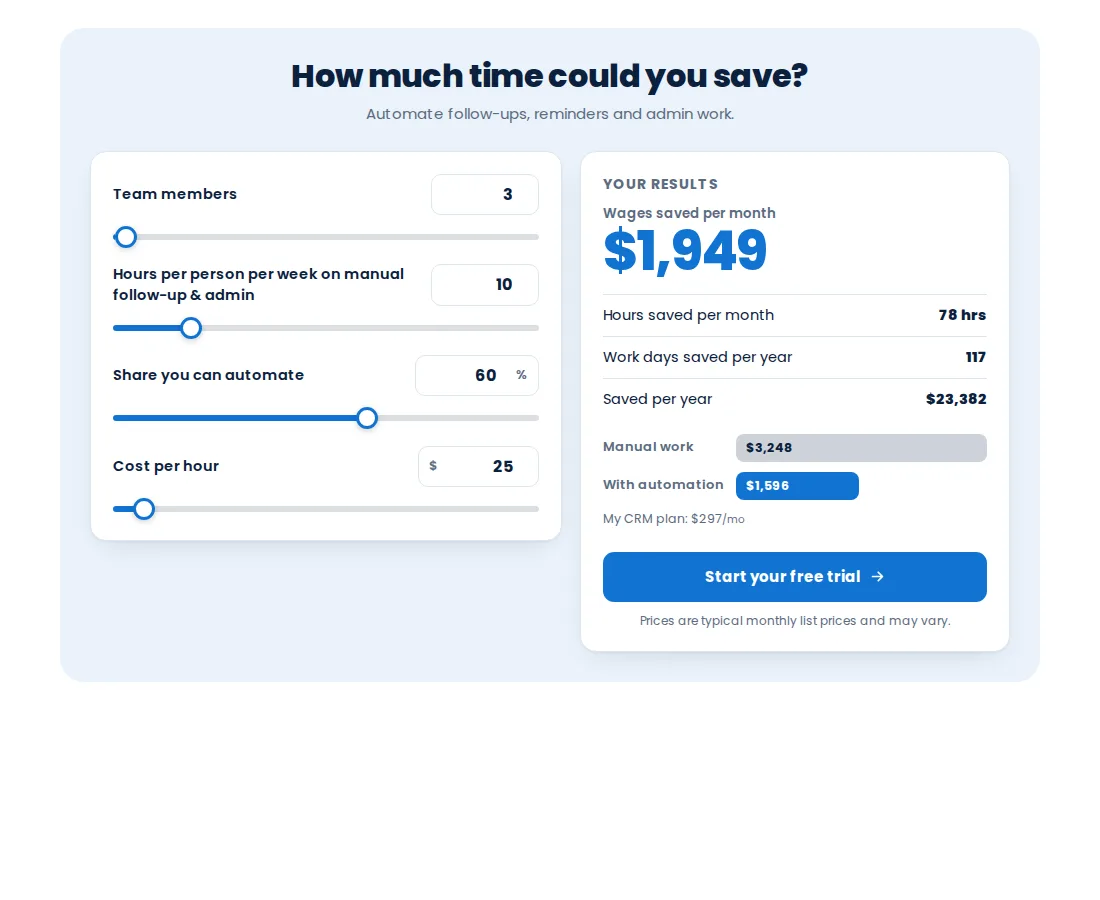
It opens on the time saved by automation calculator. Change the numbers, try another template of the same type, or put a different style on top. Then pick any other type.
Loading the live preview
Split These are live calculators on the customizer’s engine. Drag the sliders, type your own numbers, then try another style on top.
Calculators that sell the snapshots you install
Each one turns the value of an automation into a figure the prospect typed in themselves.
- 01
Selling a missed-call text-back
A missed call calculator shows a plumber what the calls they miss on a job cost them each month.
The plumbing snapshot - 02
Selling automation to a busy office
The time saved calculator turns hours of manual follow-up into wages saved per month and per year.
How the snapshots work - 03
Moving a client off five tools
The tech-stack calculator lists the tools your platform replaces with official logos and your single price.
Getting a GoHighLevel account - 04
Reactivating a dormant database
A reactivation calculator estimates what an old list is worth when a campaign wakes it up.
Workflow products
What the calculator module includes
Replace your tech stack
A chart of the tools your platform replaces, with official logos, their monthly prices and your all-in-one price.
ROI and revenue
ROI, speed to lead, no-show reducer, reactivation, email and SMS ROI, and time saved.
Us versus them
Your plan against a named competitor, in columns, cards or a feature table.
Add-on value
Missed call text-back, reviews and reputation, and AI agent against staff cost.
Your pricing, once
Plans, add-ons and currency set once for every calculator, or per calculator.
Embed, capture, export
One line on any site, leads with the result attached, or a PNG for a proposal.
In short
Calculators, in facts
- Templates
- 134
- Types
- 14
- Style presets
- 13
- Live at once
- Up to 10
- Package
- Top Elite, $1,047 one time
The process
Embed a calculator in three steps
Step 1
Pick a type and template
Choose from 14 types and 134 templates, then a layout and one of 13 styles.
Step 2
Set your pricing
Enter your plans, add-ons and currency once, choose the competitor tools and edit every label.
Step 3
Embed or share
Paste one line into any website or funnel, share the hosted page, or export a PNG for a proposal.
Which package
Calculators come with Top Elite and every package above it
- Top Starter $217does not include this
- Top Pro $517does not include this
- Top Elite $1,047includes this
The rest of the customizer
- 01Login page designs16 animated designs for sign-in, two-factor and password reset Top Starter and up
- 02Themes, UI kits and dark mode27 themes, 11 UI kits and dark mode for every screen Top Starter and up
- 03Dashboard designs18 dashboard designs, 6 of them built around a photo Top Pro and up
- 04Sidebar, top bar and menusSidebar, right dock or top bar in 8 styles, 8 mega menu styles Top Starter and up
- 05Popups43 templates in 7 formats, inside GoHighLevel and on websites Top Elite and up
- 06Notifications and social proof94 social proof and widget templates across 32 types Top Elite and up
- 07Pipeline board designs12 opportunities board designs with stage colours by position Top Pro and up
- 08Contact actions barQuick tags and workflow buttons on every contact page Top Pro and up
- 09Floating widgets51 floating contact and chat widget templates Top Elite and up
What is a GoHighLevel ROI calculator?
An interactive calculator you embed on a sales page or funnel. The prospect moves sliders or types their own numbers, such as lead volume or hours of admin, and sees the return or the saving in their own figures, with the result attached if they leave their details.
What calculator types are there?
14: Stack replacement table, Savings calculator, Us vs them, ROI calculator, Missed call text-back, Reviews and reputation, AI agent vs staff, Speed to lead, No-show reducer, Time saved by automation, Database reactivation, Email and SMS marketing ROI, Reseller profit, Price builder.
Can I set my own prices?
Yes. Set your plans, add-ons and currency once and every calculator uses them, or override pricing for one calculator.
How do I put a calculator on a website or funnel?
Embed it with one line on any website or GoHighLevel funnel, share the hosted page as a link, or export the result as a PNG for a proposal.
Do calculators capture leads?
Yes. A calculator can capture the visitor’s details with their result attached, and in Top Elite widget leads can be sent into GoHighLevel.
Are these the same as the mortgage calculators in the shop?
No. Our mortgage calculators are standalone products for lenders and brokers. The customizer calculators are value calculators for selling a service: ROI, savings, time saved, missed calls and versus-competitor comparisons.
How many calculators can be live?
Up to 10 at once in Top Elite.
Which package includes calculators?
Top Elite ($1,047 one time), with popups, notifications and floating widgets.
Finish your GoHighLevel the way you finished the snapshot
One-time payment, lifetime access. Your login is emailed within minutes, at most 24 hours, and you install it with one line of code.