



How to Book Appointments Using GHL Voice AI Agent
In today’s fast-paced world, customers expect fast and easy ways to book appointments. That’s where GoHighLevel Voice AI Agents shine.
Contents
In today’s fast-paced world, customers expect fast and easy ways to book appointments. That’s where GoHighLevel Voice AI Agents shine. While it’s not yet fully built-in with native calendar booking, there’s a powerful workaround you can use today. In this guide, we’ll walk you through how to set up GHL Voice AI to schedule appointments conversationally—and make your client experience smoother than ever.
Quick Takeaways
- GHL Voice AI Agent doesn’t natively support full calendar booking yet.
- A smart workaround using workflows and premium actions makes booking possible.
- This setup uses conversational prompts to guide leads through booking.
- You can test and train your AI bot for better responses.
- Automating appointment setting saves time and boosts your conversions.
What Is GHL Voice AI Agent and Why Use It
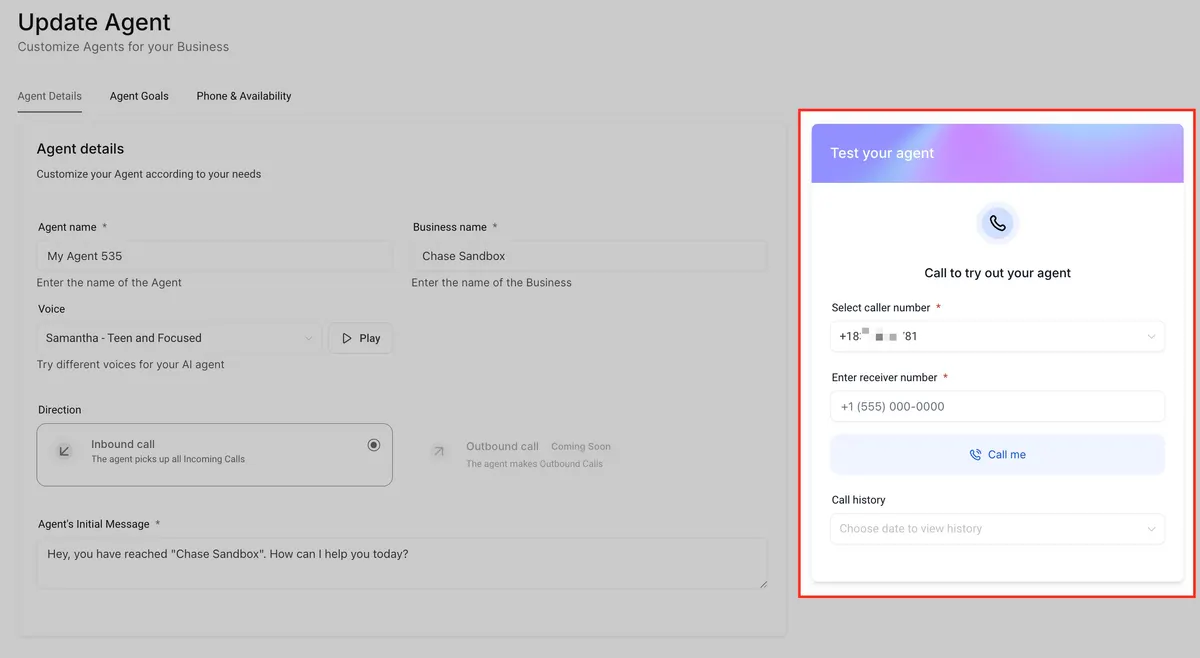
GHL (GoHighLevel) Voice AI Agent are AI-powered bots that can talk to your leads over the phone. These bots sound natural, understand intent, and can engage in full conversations. That means they can help your clients book an appointment without needing a human on the other end of the call.
While GoHighLevel is still working on full native calendar integration, there’s a neat workaround that uses workflows, calendar settings, and the Voice AI Agent smart replies.
What You Need Before You Start
To make this work, you’ll need a few things:
- A GoHighLevel account with Voice AI enabled
- Access to premium workflow actions
- An appointment calendar set up inside GHL
- Basic knowledge of workflows and triggers
Step-by-Step Setup for Appointment Booking with Voice AI
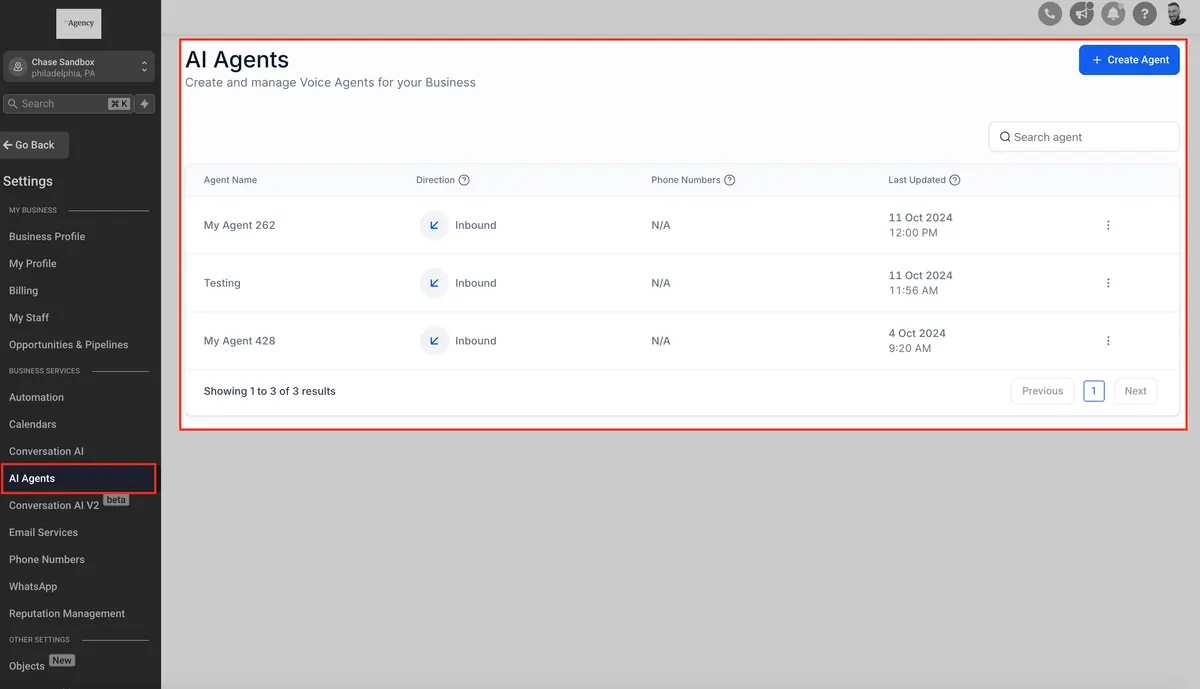
1. Enable Voice AI in Your Sub-account
Head to your GHL sub-account settings:
- Click on Settings
- Select Conversation AI
- Enable Auto-Pilot Mode so the bot can reply without waiting for manual action
Tip: Use Suggestive Mode first to test responses before going fully automated.
2. Train Your AI Agent
- Go to Bot Training and add:
- Common Q&A about booking
- Phrases like “I want to book an appointment,” “Can I schedule a call,” etc.
- Website or calendar links for more context
This helps your AI understand what users are asking.
3. Create a Calendar in GHL
If you haven’t already:
- Navigate to Calendars
- Set up a new calendar with time slots
- Make sure it’s connected to your workflow for booking
You’ll use this in the workflow later.
4. Set Up Your Workflow
- Go to Automation > Workflows and create a new one:
- Trigger: Contact replies or inbound call (Voice AI)
- Action 1: Use “If/Else” to check if the contact wants to book
- Action 2: Use Premium Action to send a booking link or webhook to create the booking
- Action 3: Send a confirmation via SMS or email
You can also add tags and notes for follow-up.
5. Use Webhooks or Booking Links
Since the AI can’t click buttons, you’ll use:
- Direct calendar links sent via SMS
- Or use webhooks to auto-book based on intent
Example: “If the contact says ‘Yes, I’m free Monday at 10,’ the bot can pass that to a webhook and auto-book the slot.”
Practical Example
Let’s say your AI bot gets a call from John. He says:
“Hi, I want to book a call with someone next week.”
Your AI replies:
“Great! Would Monday or Tuesday morning work for you?”
John says Monday. The bot confirms and triggers the workflow to send a booking link for Monday’s slot or auto-books it using a webhook.
Pricing Breakdown for Premium Actions
To use some features like webhooks and AI conversations, you’ll need access to GHL’s premium tools:
| Feature | Price |
|---|---|
| Premium Action (per use) | $0.01 per execution |
| Voice AI Message | $0.02 per message or prompt |
| Unlimited AI Messaging | $49/month per sub-account |
You can rebill these costs if you’re on the $497 Agency Pro plan.
What Is GHL Voice AI AgentGHL (GoHighLevel) Voice AI Agent are AI-powered bots that can talk to your leads over the phone. These bots sound natural, understand intent, and can engage in full conversations. That means they can help your clients book an appointment without needing a human on the other end of the call.
Conclusion
Booking appointments doesn’t have to be hard. Even though GoHighLevel is still rolling out native Voice AI calendar support, this workaround makes it super easy to book appointments through conversation. With a little setup and training, your AI agent can guide leads from “Hi” to “Booked” without missing a beat.
Try it out, test it, and tweak it—and before long, your phone agent will be your hardest-working team member.
Quick answers
Frequently asked questions
Can Voice AI really book appointments on its own?
Not natively yet, but with the workaround and workflows, yes—it can guide the lead and trigger bookings.
What’s the difference between Suggestive and Auto-Pilot Mode?
Suggestive shows replies to the user for approval. Auto-Pilot lets the AI reply on its own.
Do I need to be a developer to set this up?
Nope! Just follow the steps using GHL’s built-in tools. No coding needed.
Can I test the AI before going live?
Yes! Use the “Bot Trial” tab under Conversation AI settings to test conversations before enabling them.
Where this leaves you
Skip the build. Import a working GoHighLevel account instead.
Everything above is buildable by hand, and most people never finish. A snapshot is the same setup already made: funnels, pipelines, calendars, the prebuilt website and the automations, written for one industry and wired together before it reaches you.
- Delivered within 24 hours by email
- Install on unlimited sub-accounts you manage
- 20 hours of setup help across 15 days
Keep reading
All articles
GoHighLevel Adds Facebook, Instagram & Voice AI to All-in-One Chat Widget
Communication today happens everywhere. Customers message through Facebook, reply on Instagram, chat via SMS, leave WhatsApp messages, and increasingly rely
December 5, 20255 min read
AI Employee Overview: Automate Smarter with HighLevel’s AI Suite
Imagine hiring a smart digital assistant that never sleeps, answers calls, handles messages, writes content, manages reviews, and even automates
July 31, 20254 min read
Generate and Edit Images with Ask AI in GoHighLevel
Creating high-converting visuals shouldn’t require a design degree or expensive software. Whether you’re building landing pages, sending email campaigns, or
July 28, 20255 min read