A layered confirmation sequence that cuts no-shows without nagging the people who were always coming.
4.8 (14)19 sold in the last 30 days
15 people are viewing this right now
Layered confirmation
Reply-to-confirm
Unconfirmed bookings flagged
What is in the workflow
The workflow itself
Every trigger, condition, wait step and action, built and tested end to end.
Message templates
The email and SMS copy for each step, written rather than left as placeholder text.
Tags and custom fields
The supporting tags and fields the workflow depends on, created on import.
Timing controls
Wait times and send windows exposed as values you can change without editing the logic.
Delivered
Within 24 hours
Installs
Unlimited sub-accounts
Support
20 hours, 15 days
Updates
Free for one year
app.gohighlevel.com
$40$50Save 20%
One-time payment. Unlimited installs. One year of free updates.
Only 9 seats left in this pricing cohort
Emailed within 24 hours of purchase
Install on unlimited sub-accounts you manage
See it working on a demo call before you buy
Secure checkout by Stripe
Delivered in 24 hours
Share link by email
Unlimited installs
Every account you manage
Free updates
For a full year after purchase
Secure checkout
Handled by Stripe
What this replaces
Built from the patterns that actually convert in this category.
01
No-shows are pure loss
An empty slot cannot be resold at short notice, so every missed appointment is revenue that never existed.
02
One reminder is not enough
A single email the day before gets lost, and a single SMS an hour before is too late to refill the slot.
03
Manual confirming eats the front desk
Someone spends their morning phoning tomorrow's bookings one at a time.
The path a lead takes, without anyone driving it
1
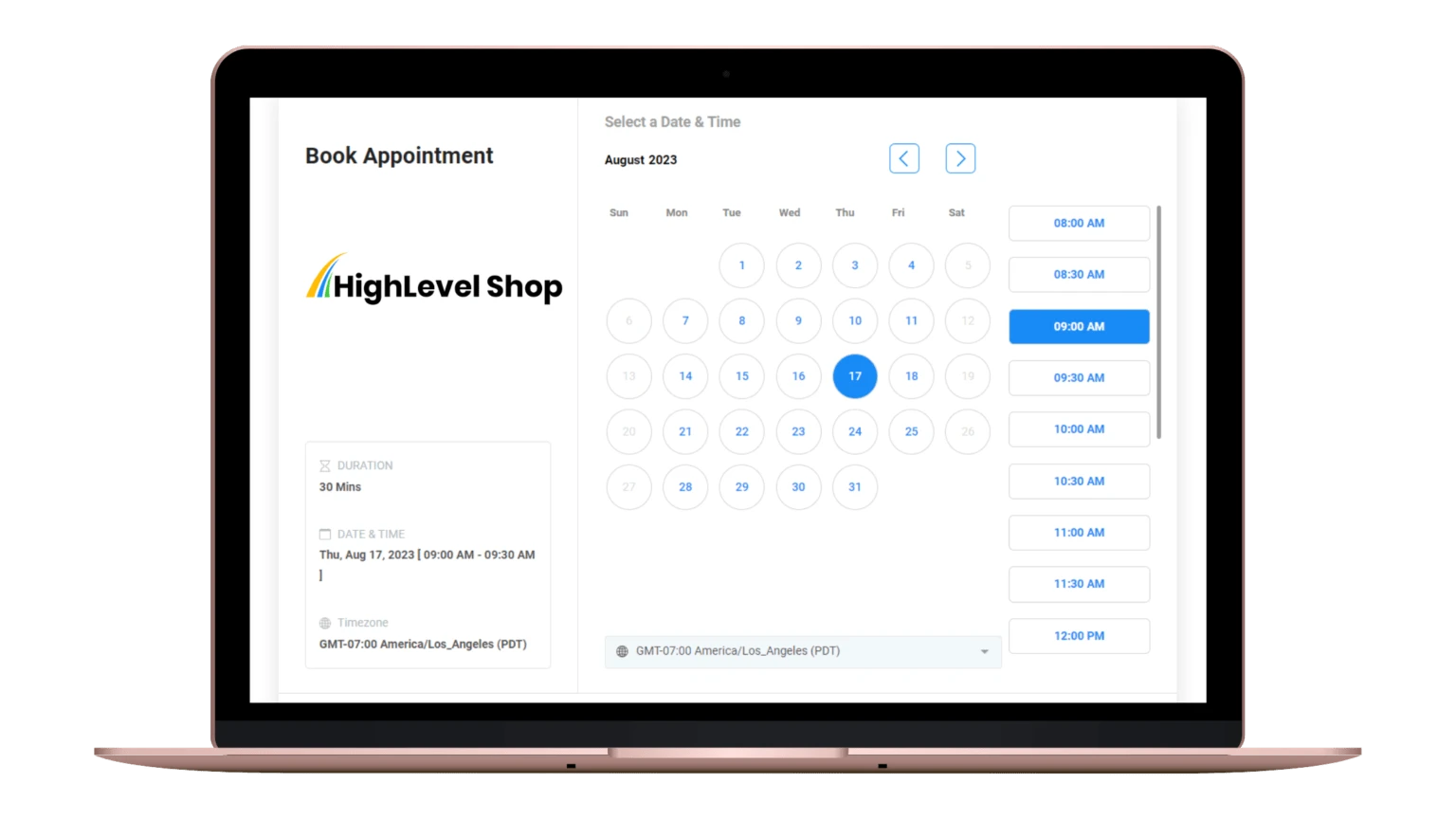
Appointment booked
2
Immediate confirmation
3
72-hour reminder
4
24-hour confirm request
5
2-hour nudge or escalation
Problem and fix
Which part solves which problem
Every claim below names the mechanism behind it. If a feature is not doing a job on this list, it is not in the Appointment confirmation snapshot.
The problem
No-shows are pure loss
An empty slot cannot be resold at short notice, so every missed appointment is revenue that never existed.
What removes it
Booking with layered reminders
The appointment is booked against real availability, then confirmed and reminded twice before it happens, which is what actually cuts no-shows.
The problem
One reminder is not enough
A single email the day before gets lost, and a single SMS an hour before is too late to refill the slot.
What removes it
AI chat widget on every page
Do you cover my area gets answered in the moment, instead of the lead closing the tab and asking someone else.
The problem
Manual confirming eats the front desk
Someone spends their morning phoning tomorrow's bookings one at a time.
What removes it
Review harvesting with a rating gate
Happy leads are pushed to Google. Unhappy ones are routed to a private feedback form first, so the problem reaches you before it reaches the public.
Everything wired and working on import
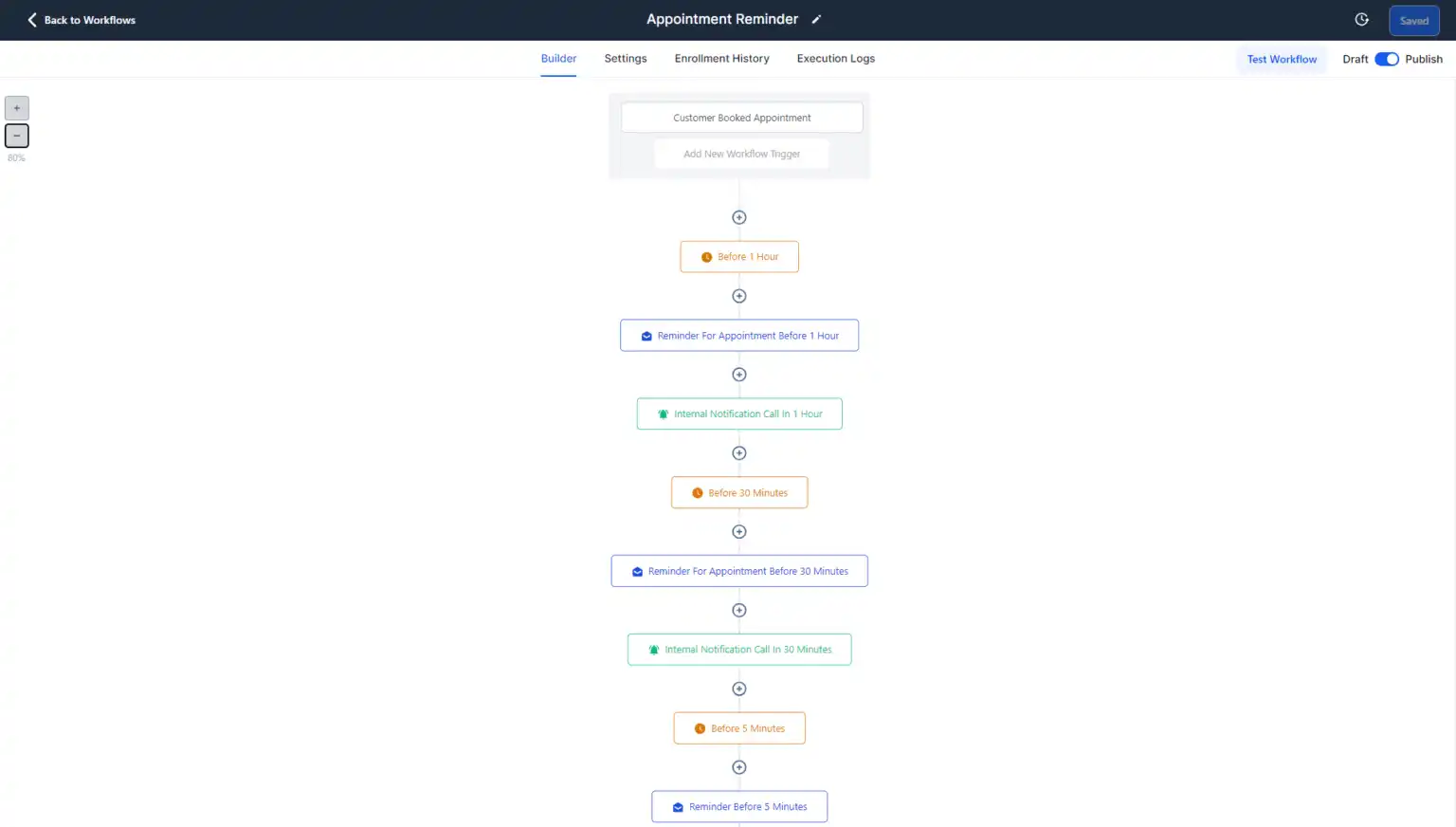
Four-touch cadence
Booking confirmation, 72-hour reminder, 24-hour confirm request and a 2-hour final nudge.
Reply handling
Inbound replies branch to confirmed, cancelled or reschedule paths automatically.
Send-window control
Quiet hours respected so a 2am reminder never fires.
Unconfirmed escalation
Bookings still unconfirmed after the final touch create a task for the front desk.
Cancellation handling
A cancellation releases the slot and can notify a waitlist.
Editable timing
Every wait step is a value you can change without touching the workflow logic.
Review harvesting
How the review engine gets you five-star reviews
Asking for reviews by hand does not survive a busy week. The Appointment confirmation snapshot asks every lead automatically, then sends them down one of two paths depending on how they rate you.
The ask fires on its own
The workflow watches for the job is marked complete and sends the request itself, by text and by email, without anyone adding it to a to-do list.
Or they scan the QR code
The same link sits behind a QR code you can put on the leave-behind card and in the follow-up text. Scanning it opens exactly the same form.
They tap one star rating
The form opens on five stars and nothing else. Whatever the lead taps routes them, and they never see the other path.
The rating decides what happens next
Five stars: straight to the public platforms
Tap five and there is nothing else to fill in. They pick a platform, the review box is already open, and the review is live in under a minute.
Google Business Profile
Facebook
Yelp
or any platform you add
Ends up public
Four stars or fewer: a private feedback form
Four or below and the public platforms never appear. They get a feedback box, it lands on their contact record, and you get a notification the same minute.
What went wrong, in their words
Which stage of the appointment it happened at
Whether they want a call back
Logged on the contact record, not on the internet
Stays private, lands on your desk
More five-star reviews reach Google, and the four-star complaints reach you first. That is the entire point of the gate.
What is true once it is running
Layered confirmation
Touches at booking, 72 hours, 24 hours and 2 hours, across email and SMS.
Reply-to-confirm
A one-word reply confirms or cancels, and cancellations free the slot early enough to refill.
Unconfirmed bookings flagged
Anyone who has not responded by the final touch surfaces as a task for the team.
Verified, with the original attached
What it is like to buy from us
“
These Guys are hands down the best and not because of the quality of their work, but their Customer Service is top tier! Highly recommend Muhammad and His team!!!
La'Mont PayneOn the support team
Thanks to the team! They were very helpful when I needed assistance, and they responded quickly and communicated effectively. Thanks again!
George MunozOn the support team
Shoutout to the team over at GoHighLevel Shop! As a Certified Admin for GHL, I needed some solid work done for a big client of ours and needed a top of line Snapshot for them. GoHighLevel Shop Delivered! Great Job guys!
Sent in by customers describing what they bought and what they did with it.
What stands out about Top GHL Snapshots is that they understand the actual implementation side of HighLevel. Whether it's a snapshot, dashboard, funnel, or custom work, the focus is on getting something usable into the account rather than just handing over another template.
EPEthan ParkerGoHighLevel consultant, Arizona
The product gave us the starting point, but the support made the biggest difference. We were able to ask questions, adjust the setup around our own process, and get much closer to the system we actually wanted.
MCMadison CarterDigital agency owner, North Carolina
We've built plenty of HighLevel accounts manually, so I know how many hours disappear into pipelines, forms, calendars, workflows, and pages. Starting with a prepared system makes it much easier to spend that time on customization instead.
ZHZachary HallMarketing agency founder, Illinois
I like that I can come to one place for more than just snapshots. We've needed funnels, dashboard work, mortgage tools, and design resources at different times, and having those options in the same ecosystem makes projects easier to manage.
BYBrittany YoungCRM specialist, California
What ships in the box
Single-purpose automation recipes that drop into any GoHighLevel account and start working.
Delivery
Share link by email within 24 hours
Format
Native GoHighLevel workflow
Scope
One focused automation, not a full build
Installs
Unlimited sub-accounts you own or manage
Updates
Free for one year after purchase
Requires
A GoHighLevel account
The workflow itself
Every trigger, condition, wait step and action, built and tested end to end.
Message templates
The email and SMS copy for each step, written rather than left as placeholder text.
Tags and custom fields
The supporting tags and fields the workflow depends on, created on import.
Timing controls
Wait times and send windows exposed as values you can change without editing the logic.
Setup notes
What to connect, what to test and what to change before you publish it.
Done for you
Done for you, then 20 hours of support
The snapshot is not the end of it. You get 20 hours of hands-on customisation, usable across the 15 days that start once your snapshot is delivered.
Import into whichever sub-account should run it. Supporting tags and fields are created automatically.
3
Edit the message copy
Adjust the email and SMS templates to your voice and add your business details.
4
Set the timing
Change wait times and send windows to suit your audience and time zone.
5
Test, then publish
Run it against a test contact, confirm every step fires, then move it from draft to published.
4 touches
Confirmation cadence from booking through to two hours before
Two-way
Reply handling that branches on confirm, cancel or reschedule
Quiet hours
Send windows that stop reminders firing overnight
Questions before you buy
Something not covered here? Email us and a person will answer.
Will it double-send with HighLevel's built-in reminders?
It can, so switch the native calendar reminders off when you publish this. The setup notes cover exactly where that setting lives.
Does it work with any calendar?
Yes. It triggers on appointment booked, so any HighLevel calendar in the sub-account can drive it.
How does the Appointment confirmation snapshot turn a website visitor into a booked appointment?
In five steps, all automatic. The prebuilt site captures the lead on an intake form that asks what they need, when they need it and how to reach them. Submitting it creates the contact, tags it and starts the workflow. An email and SMS go out in seconds that confirms the enquiry and offers the next two available slots. Anyone who will not fill a form gets the AI chat widget or the AI receptionist instead. The contact then sits in a pipeline running New lead, Qualified, Quoted, Won, Delivered, with automation attached to each stage.
How does the review system get more five-star reviews?
It asks every lead automatically as soon as the job is marked complete, by SMS and email, and via a QR code you can put on the leave-behind card and in the follow-up text. The rating they tap decides the path: five stars opens Google, Facebook or Yelp with the review box ready, while four or fewer opens a private feedback form that saves to the contact record and alerts you instead.
What does the AI receptionist do that an answerphone does not?
It answers. A call that comes in after hours is picked up on the first ring, asked the qualifying questions you would ask, and booked straight into the calendar. Anything it cannot handle triggers a missed-call text back within seconds, so the conversation is still open when you get to it.
How quickly does the snapshot pay for itself?
That is arithmetic rather than a promise: divide the one-time price by your average job value. The calculator on this page does it with your own figure. Because the price is one-time and installs are unlimited, everything past that number of jobs is margin.
Will this conflict with workflows I already have?
It imports as a separate workflow with its own trigger, so nothing existing is modified. Check that its trigger does not overlap with one of yours in a way that would double-send.
Can I change the timing?
Yes. Wait times and send windows are exposed as editable values, so you can retime the sequence without rebuilding the logic.
Does it work in any industry?
Yes. Workflow products are deliberately industry-neutral, so the copy is written to be edited rather than assuming a trade.
Is it paused when it arrives?
Yes. Every workflow imports in draft so nothing fires at your contact list before you have tested it.
Start your GoHighLevel account through our link and we will take 15% off any snapshot you buy. Email us the account you signed up with and we apply it to your order.
We earn a commission if you sign up through that link, at no extra cost to you. Full disclosure.
Appointment Confirmation
Workflow
$40
Picked up where you left off
Popular searches
Before you go
Want first word on our discounts?
We do not run a discount every week, and we will not pretend otherwise. Leave your email and you will hear when we do, along with new snapshots as they land.
TopGHLSnapshots respects your privacy
We use cookies to run the site, measure traffic, and improve your experience, and you choose what's on. See our Privacy Policy.
Top GHL Snapshots only uses cookies as described above; necessary cookies keep the site working.
TopGHLSnapshots cookie preferences
Manage how we use cookies. Necessary cookies keep the site working and can't be turned off.