



Gohighlevel onboarding
GoHighLevel is a powerful platform designed to simplify CRM, marketing automation, and client management for businesses and agencies. Getting started
Contents
GoHighLevel is a powerful platform designed to simplify CRM, marketing automation, and client management for businesses and agencies. Getting started with GoHighLevel might feel overwhelming, but a structured onboarding process can help you set up the platform efficiently and unlock its full potential.
This guide walks you through the onboarding process, from initial setup to configuring key features and using tools to manage your business.
Key Takeaways
- Learn how to set up your GoHighLevel account and customize it for your business.
- Discover key features like workflows, SaaS Mode, and pipelines.
- Get tips for creating a smooth onboarding experience for your clients.
GoHighLevel onboarding
GoHighLevel onboarding is the guided process of setting up your GoHighLevel account so you can start using its tools effectively. Whether you’re a business owner or a marketing agency, onboarding helps you get everything configured—from branding to automation—so the platform works for your specific needs.
Setting Up Your GoHighLevel Account
Sign Up and Login
- Start by selecting a pricing plan that fits your needs: Starter, Unlimited, or Agency Pro.
- Log in to the platform via GoHighLevel.
Complete Your Profile
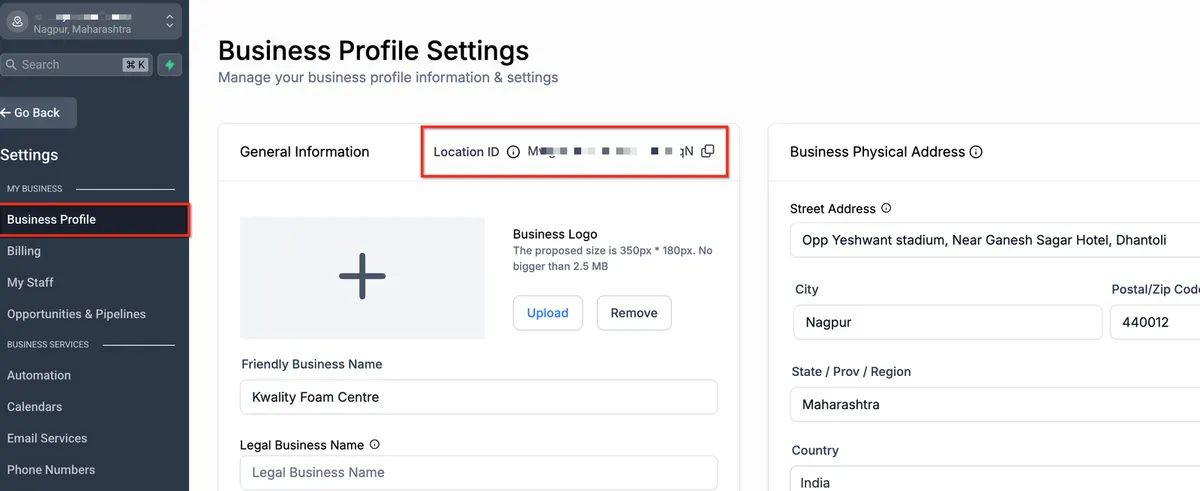
- Navigate to Settings > Business Profile to add your business details, including name, address, and logo.
- Customize your profile to reflect your branding.
Configure Email and Phone Systems
- Set up the LC Phone System for SMS and call functionalities.
- Integrate an email system like Mailgun or LeadConnector to handle campaigns and notifications.
Customizing the Platform
White-Labeling (For Agencies)
- Remove GoHighLevel branding by uploading your logo, customizing your domain, and setting up SaaS Mode (if applicable).
Connect Your Payment Processor
- Integrate Stripe to enable invoicing, subscription management, and SaaS sales.
Import Snapshots
- Use industry-specific snapshots to pre-load workflows, funnels, and email templates tailored to your niche.
Configuring Key Features
Set Up Pipelines
- Navigate to Opportunities > Pipelines to create custom sales pipelines.
- Define pipeline stages like “Lead Capture,” “Qualification,” and “Close”.
Automate Workflows
- Go to Automation > Workflows to create automations for lead nurturing, follow-ups, or appointment reminders.
- Use templates or build workflows from scratch.
Build Landing Pages and Funnels
- Use the Sites section to create high-converting pages with the drag-and-drop editor.
- Add forms, videos, and CTAs to capture leads effectively.
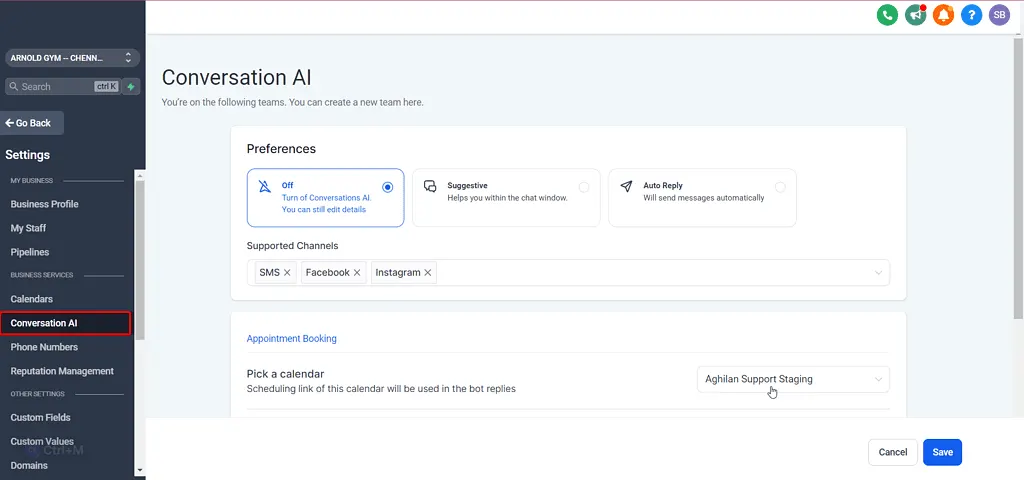
Enable Conversation AI
- Leverage AI-powered tools for automating customer interactions through SMS, web chat, and social media.
Onboarding Your Team
Create User Accounts
- Add team members under Settings > My Staff with assigned roles and permissions.
Provide Training
- Use GoHighLevel’s training resources, including the Knowledge Base and YouTube tutorials.
Set Team Goals
- Define clear objectives for your team to maximize the platform’s efficiency.
Onboarding Your Clients
Create Sub-Accounts
- Use the Agency View to set up sub-accounts for clients, preloading them with custom snapshots.
Share Tutorials and FAQs
- Provide your clients with onboarding guides and access to the Knowledge Base.
Establish Communication
- Use workflows to automate welcome emails and schedule kickoff calls with clients.
Testing and Launch
Run Tests
- Test workflows, pipelines, and campaigns to ensure they function as expected.
Launch Live Campaigns
- Begin running email or SMS campaigns, tracking performance via analytics.
Monitor and Optimize
- Use GoHighLevel’s reporting tools to track KPIs like open rates, lead conversions, and pipeline progress.
🚀 Get Started with GoHighLevel Onboarding
Get set up in minutes and start capturing leads, automating follow-ups, and growing your business — all in one place.
Click Here
Conclusion
The GoHighLevel onboarding process is designed to help you hit the ground running. By following this step-by-step guide, you can set up your account, customize the platform, and onboard your team and clients effectively.
Start your GoHighLevel journey today to unlock its full potential for your business!
Quick answers
Frequently asked questions
How long does the onboarding process take?
Typically, the setup process can be completed in 1-2 weeks, depending on your business size and customization needs.
Can I use GoHighLevel without coding knowledge?
Yes, GoHighLevel’s user-friendly interface and drag-and-drop tools make it accessible to users without technical expertise.
What are snapshots and how do they help with onboarding?
Snapshots are prebuilt setups containing workflows, funnels, and templates tailored to specific industries, helping you save time during setup.
Is training available for teams and clients?
Yes, GoHighLevel offers a comprehensive Knowledge Base, webinars, and tutorial videos for training.
What’s included in SaaS Mode?
SaaS Mode allows agencies to white-label the platform and resell it to clients, complete with customized features and pricing.
Where this leaves you
Skip the build. Import a working GoHighLevel account instead.
Everything above is buildable by hand, and most people never finish. A snapshot is the same setup already made: funnels, pipelines, calendars, the prebuilt website and the automations, written for one industry and wired together before it reaches you.
- Delivered within 24 hours by email
- Install on unlimited sub-accounts you manage
- 20 hours of setup help across 15 days
Keep reading
All articles
Pre-Built A2P Campaign Widget-First Registration flow
If you’ve ever struggled with A2P 10DLC registration, you know how confusing and rejection-prone the process can be. One small
March 13, 20265 min read
Voice Dictation in AI Builder & Assistant
Build Powerful Workflows Just by Speaking Imagine building a complete automation without typing a single word. No clicking through triggers.
February 27, 20264 min read
Conversation AI Auto Follow-Up
The Smart Way to Re-Engage Leads Without Manual Work Leads don’t always ghost you on purpose. Sometimes they get busy.
February 20, 20264 min read