



Conversation AI Auto Follow-Up
The Smart Way to Re-Engage Leads Without Manual Work Leads don’t always ghost you on purpose. Sometimes they get busy.
Contents
The Smart Way to Re-Engage Leads Without Manual Work
Leads don’t always ghost you on purpose. Sometimes they get busy. Sometimes they forget. Sometimes life just happens.
That’s exactly where Conversation AI Auto Follow-Up steps in.
Instead of building complicated workflows or manually chasing cold conversations, this feature allows your AI bot to automatically detect when a contact drops off and send smart, natural follow-ups at the right time. It feels human. It works in the background. And it keeps deals moving forward without you lifting a finger.
If you’re serious about reducing lead leakage and increasing conversions, this is one feature you’ll want turned on.
Key Takeaways
- Automatically detects when contacts stop responding
- Schedules follow-ups with customizable delays
- Resets automatically when a contact replies
- Works across SMS, Live Chat, Facebook, Instagram, and WhatsApp
- Respects business hours with working-hours awareness
- Optional channel switching to keep conversations alive
- No complex workflow building required
What Is Conversation AI Auto Follow-Up
Conversation AI Auto Follow-Up is a built-in feature that allows your AI chatbot to automatically re-engage contacts who:
- Stop replying
- Say they’re busy
- Ask to be followed up later
- Go inactive during a live chat
Instead of requiring manual follow-up or complex automation workflows, the AI handles it intelligently in real time.
The moment a contact replies, the system resets the follow-up schedule automatically. This ensures conversations feel natural instead of robotic or pushy.
How Auto Follow-Up Works
Let’s break this down step by step.
Smart Drop-Off Detection
- The system recognizes when:
- A contact stops responding
- Someone says, “I’m in a meeting” or “Call me later.”
- A user asks for a specific follow-up time
The AI stores that intent and prepares the next action automatically.
Example
If a lead says, “I’m driving right now,” the AI understands this as temporary unavailability and schedules a re-engagement message.
Automated Scheduling With Custom Cadence
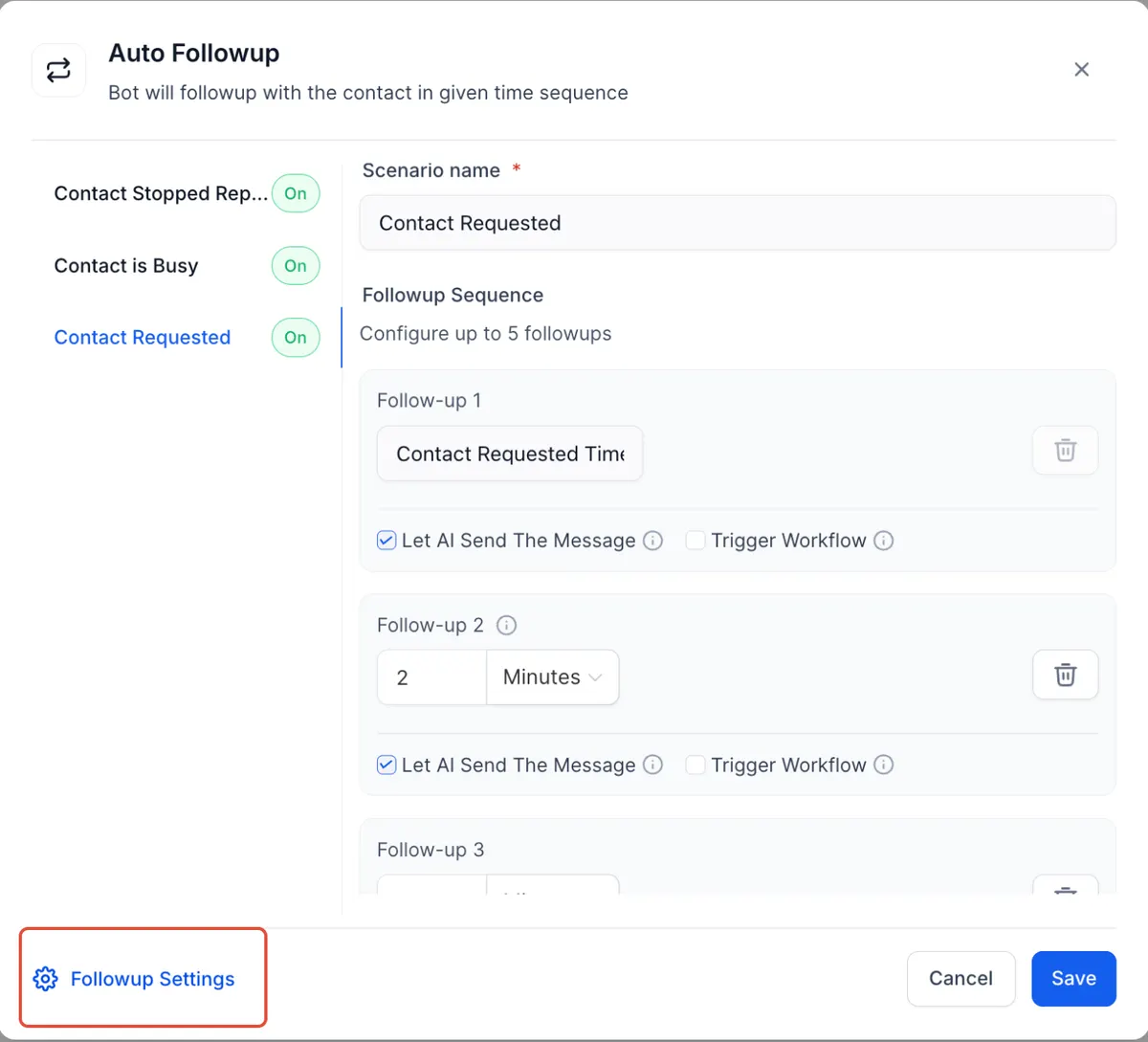
Once inactivity is detected, you can define follow-up intervals such as:
- 5 minutes later
- 15 minutes later
- 1 hour later
- Next day
- Custom time requested by the contact
This flexibility helps you avoid sounding spammy while staying top of mind.
Important rule
If the contact responds at any point, the follow-up sequence resets immediately.
Custom Messaging or AI-Generated Messages
You can:
- Let AI generate follow-up responses
- Write your own follow-up messages
- Trigger optional workflows for tagging or notifications
Best practice
Avoid triggering another bot inside a workflow. Doing so can interrupt or break the follow-up logic.
Working Hours Awareness
One of the most powerful aspects of Conversation AI Auto Follow-Up is business-hour sensitivity.
If your working hours are set from 8 AM to 5 PM and a follow-up is due at 9 PM, the system will:
- Pause the message
- Send it at 8 AM the next business day
This protects your brand reputation and prevents awkward late-night texts.
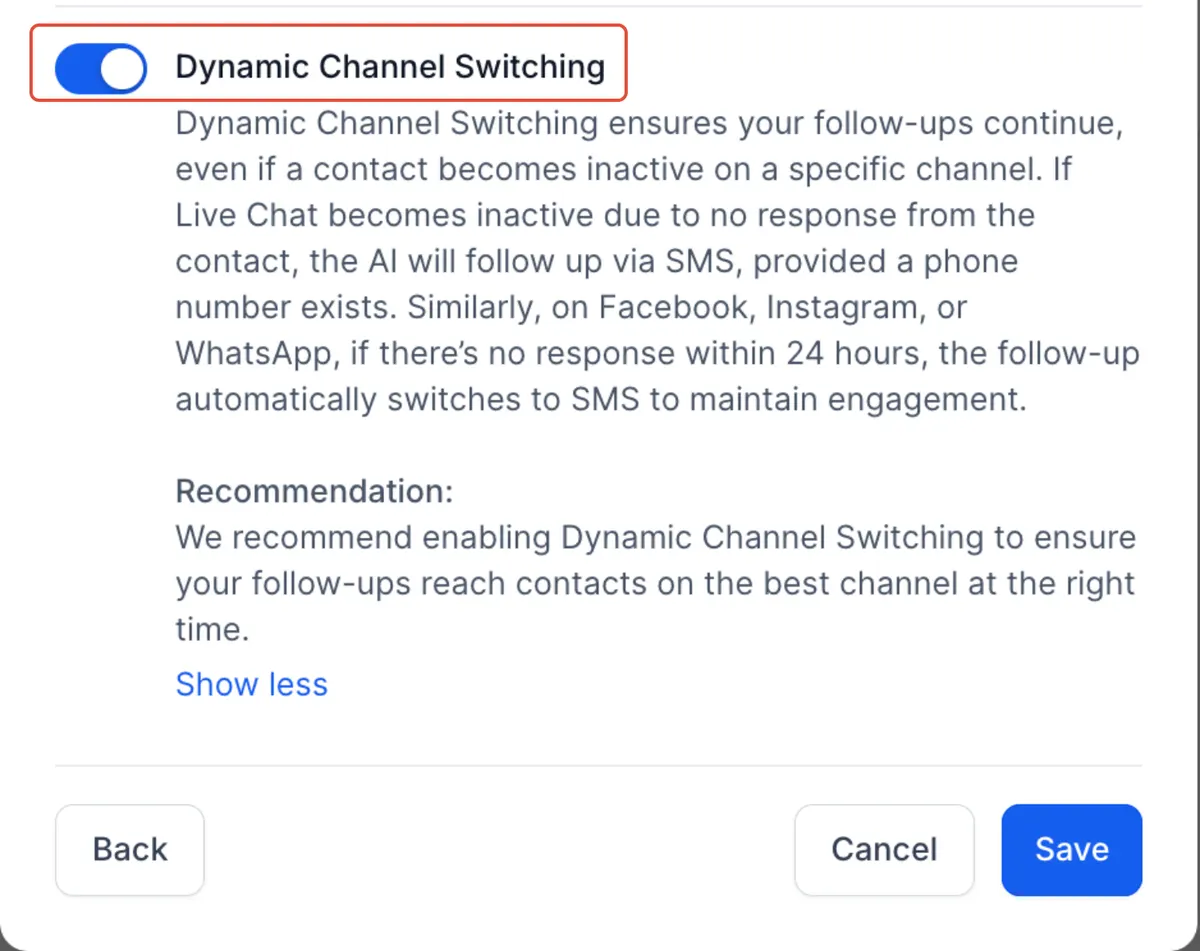
Dynamic Channel Switching
Sometimes conversations stall on one platform. Auto Follow-Up helps prevent that.
Optional channel switching allows:
- Live Chat inactivity → switch to SMS
- Facebook, Instagram, or WhatsApp inactivity → switch to SMS after 24 hours
This increases the chance of reconnecting while keeping communication smooth.
You can disable this feature if you prefer to stay on one channel.
Full Visibility and Transparency
All scheduled follow-ups appear in the Response Info panel.
This gives you:
- Clear visibility into what’s scheduled
- Reasons for each follow-up
- Timing details
- Conversation history context
No guessing. No confusion.
How to Set Up Conversation AI Auto Follow-Up
Follow these steps to activate and configure the feature.
Step 1:
Enable Conversation AI in your sub-account settings.
Step 2:
Switch to autopilot mode if you want the bot to respond automatically.
Step 3:
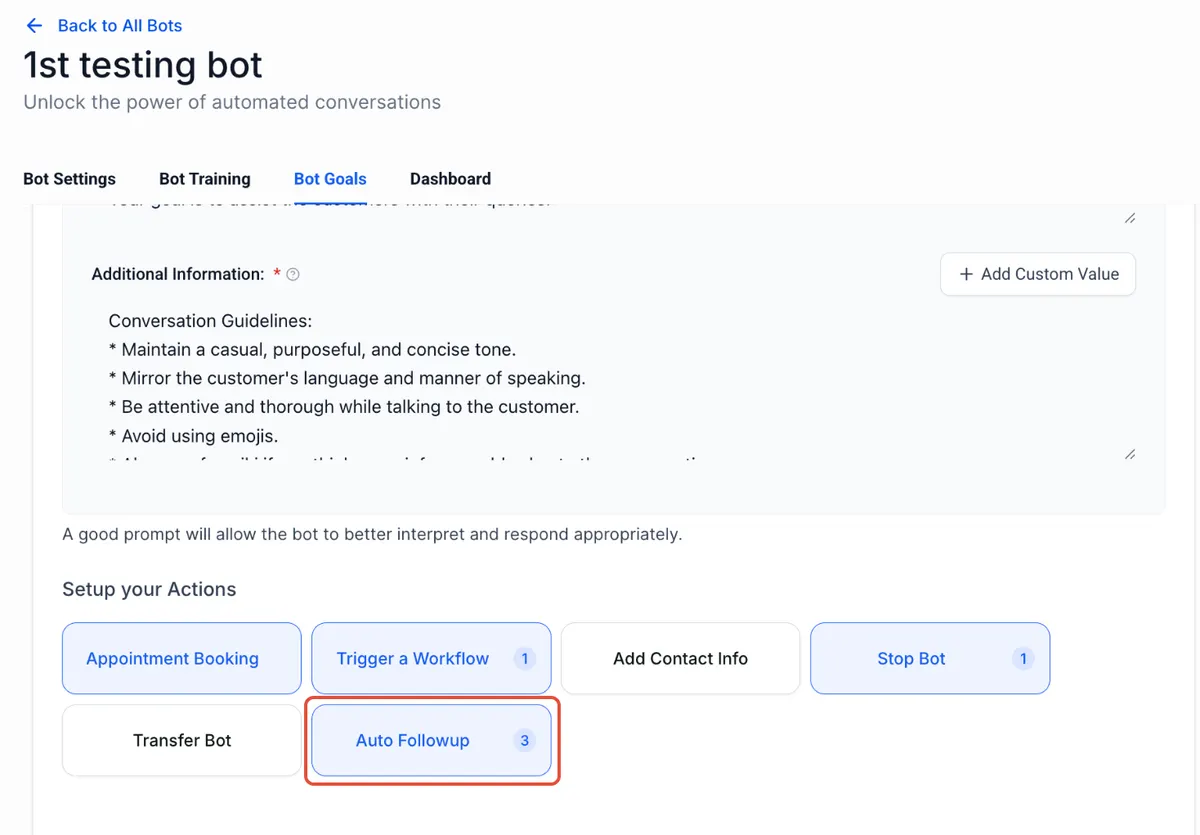
Enable Auto Follow-Up inside the Conversation AI settings.
Step 4:
Configure:
Follow-up delay intervals
- Custom messaging
- Working hours
- Channel switching preferences
Step 5
Test using the Bot Trial feature to simulate real conversations.
Once active, the system handles drop-offs automatically.
Pricing Breakdown
Conversation AI operates under two pricing models.
Pay Per Usage
$0.02 per message
If 1,000 follow-up messages are sent in a month
1,000 × $0.02 = $20 total
Unlimited Plan
$97 per month for unlimited Conversation AI usage
If your business sends high volumes of messages, the unlimited plan often becomes more cost-effective.
Example comparison
- 5,000 messages per month
- 5,000 × $0.02 = $100
Unlimited plan = $97
In this case, the unlimited plan saves money.
Always calculate based on your average monthly message volume.
Why Conversation AI Auto Follow-Up Matters
Most leads don’t convert because businesses forget to follow up.
Studies consistently show that multiple follow-ups significantly increase close rates. Yet most businesses stop after one attempt.
Conversation AI Auto Follow-up solves this problem by:
- Reducing manual workload
- Preventing lead leakage
- Increasing engagement
- Maintaining natural conversation flow
- Boosting conversion rates
It’s like having a digital assistant who never forgets.
Conclusion
Conversation AI Auto Follow-Up is more than just automation. It’s intelligent engagement.
It bridges the gap between human behavior and digital communication. It understands when people get busy, respects business hours, and reconnects at the right moment.
If you’re losing leads because conversations go cold, this feature alone can dramatically improve your follow-up system.
Turn it on. Test it. Refine it.
Then let your AI handle the chasing while you focus on closing.
Quick answers
Frequently asked questions
Does Auto Follow-Up work if the bot is turned off?
No. The bot must be active for follow-ups to be scheduled and sent. What happens if the contact replies after the? first follow-up The entire follow-up schedule resets immediately.
Can I customize the follow-up messages?
Yes. You can use AI-generated messages or write your own.
Does it send messages outside business hours?
No, if working hours are configured. It waits until the next active window.
Can it switch from Live Chat to SMS automatically?
Yes, dynamic channel switching is available and optional.
Where this leaves you
Skip the build. Import a working GoHighLevel account instead.
Everything above is buildable by hand, and most people never finish. A snapshot is the same setup already made: funnels, pipelines, calendars, the prebuilt website and the automations, written for one industry and wired together before it reaches you.
- Delivered within 24 hours by email
- Install on unlimited sub-accounts you manage
- 20 hours of setup help across 15 days
Keep reading
All articles
Pre-Built A2P Campaign Widget-First Registration flow
If you’ve ever struggled with A2P 10DLC registration, you know how confusing and rejection-prone the process can be. One small
March 13, 20265 min read
Voice Dictation in AI Builder & Assistant
Build Powerful Workflows Just by Speaking Imagine building a complete automation without typing a single word. No clicking through triggers.
February 27, 20264 min read
Manus Triggers and Actions in Workflows
AI automation is evolving fast. If you’ve ever wished you could fully control AI tasks inside your CRM without relying
February 18, 20265 min read