



Build App Using GoHighLevel
Building an App Using GoHighLevel GoHighLevel offers powerful white-labeling capabilities that allow agencies and businesses to create branded apps tailored
Contents
- Building an App Using GoHighLevel
- Key Takeaways
- Why Build an App with GoHighLevel?
- Step-by-Step Guide to Building Your App
- Set Up Your Agency Account
- White-Label Your App
- Activate SaaS Mode
- Build Core Features
- Enable Mobile App Functionality
- Test Your App
- Launch Your App
- Use Cases for Your GoHighLevel App
- FAQs
- Conclusion
Building an App Using GoHighLevel
GoHighLevel offers powerful white-labeling capabilities that allow agencies and businesses to create branded apps tailored to their clients’ needs. With its extensive features for CRM, marketing automation, and SaaS functionality, you can design an app that not only enhances client management but also generates recurring revenue for your business.
Key Takeaways
- Create a branded app with GoHighLevel’s white-label functionality.
- Utilize SaaS mode to monetize the app and build recurring revenue.
- Integrate essential features like CRM, marketing tools, and automation workflows.
- Build and deploy apps for mobile and desktop platforms.
Why Build an App with GoHighLevel?
White-Label Experience
Offer a fully branded platform, complete with your logo, colors, and custom domain.All-in-One Functionality
Combine CRM, email marketing, SMS, and automation workflows into one cohesive app.SaaS Revenue Opportunities
Enable SaaS mode to resell your app as a subscription service under your brand, opening up new revenue streams.Ease of Use
GoHighLevel’s setup is user-friendly, requiring no advanced technical skills.
Step-by-Step Guide to Building Your App
Set Up Your Agency Account
- Sign up for GoHighLevel on the official website.
- Select the Agency Pro Plan ($497/month) to unlock SaaS mode and advanced features.
White-Label Your App
- Go to Agency Settings and configure white-label options:
- Upload your logo and favicon.
- Add your custom domain for a branded login page.
- Customize the email and SMS sending domains.
Activate SaaS Mode
- Navigate to the SaaS Configurator in your Agency account.
- Set up pricing plans, attach snapshots, and configure features like automation, email campaigns, and CRM tools.
- Integrate your Stripe account to handle subscription billing directly within the app.
Build Core Features
Incorporate the following tools to maximize your app’s functionality:
- CRM: Manage customer data, leads, and communication history.
- Marketing Automation: Automate email and SMS campaigns for lead nurturing and follow-ups.
- Pipelines: Track sales and client progress through custom pipeline stages.
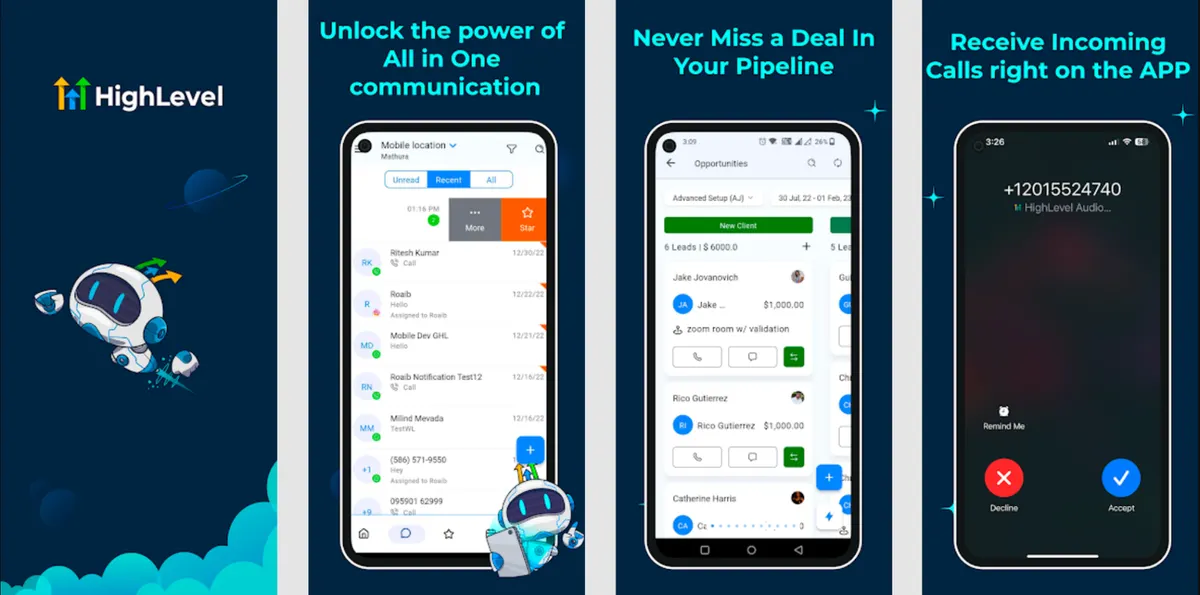
- Conversation AI: Use AI-driven chatbots to engage customers on channels like SMS and web chat.
Enable Mobile App Functionality
- Configure your mobile app settings to offer clients an app for Android and iOS.
- Customize the app with your brand’s design and publish it under your agency’s name.
Test Your App
- Create a test account and simulate user scenarios to ensure all features function correctly.
- Test automation workflows, email/SMS campaigns, and client portals.
Launch Your App
- Promote your app through email campaigns, social media, and client outreach.
- Offer onboarding sessions to help clients navigate the app’s features.
Use Cases for Your GoHighLevel App
CRM Management
Offer an app that helps clients track leads, manage contacts, and nurture relationships.Marketing Automation Hub
Build a platform that automates marketing efforts, such as sending promotional emails and scheduling SMS campaigns.SaaS Reselling
Create subscription-based plans for your clients, generating monthly recurring revenue.Client Portal
Provide a self-service portal where clients can manage their accounts, view analytics, and make payments.
FAQs
Can I fully customize the app with GoHighLevel?
Yes, GoHighLevel supports white-labeling for branding and feature customization, although it’s not designed for coding custom software.
Do I need technical skills to create an app?
No, the platform is user-friendly and provides guides to help you through setup and customization.
How does SaaS mode help my business?
SaaS mode allows you to monetize the app by offering subscription plans to your clients, creating a scalable revenue stream.
What platforms does the app support?
The app supports web, Android, and iOS platforms, ensuring accessibility for your clients.
Conclusion
Building an app with GoHighLevel is a straightforward way to enhance client engagement and grow your business. With its white-labeling capabilities, SaaS mode, and robust marketing tools, you can create a branded, feature-rich app that meets your clients’ needs while generating recurring revenue. Start today and watch your agency thrive!
Where this leaves you
Skip the build. Import a working GoHighLevel account instead.
Everything above is buildable by hand, and most people never finish. A snapshot is the same setup already made: funnels, pipelines, calendars, the prebuilt website and the automations, written for one industry and wired together before it reaches you.
- Delivered within 24 hours by email
- Install on unlimited sub-accounts you manage
- 20 hours of setup help across 15 days
Keep reading
All articles
Pre-Built A2P Campaign Widget-First Registration flow
If you’ve ever struggled with A2P 10DLC registration, you know how confusing and rejection-prone the process can be. One small
March 13, 20265 min read
Voice Dictation in AI Builder & Assistant
Build Powerful Workflows Just by Speaking Imagine building a complete automation without typing a single word. No clicking through triggers.
February 27, 20264 min read
Conversation AI Auto Follow-Up
The Smart Way to Re-Engage Leads Without Manual Work Leads don’t always ghost you on purpose. Sometimes they get busy.
February 20, 20264 min read