



Mastering Multi-Language Support in HighLevel AI and Platform
If you’re building global client experiences, offering support in just one language is no longer enough. Whether you’re managing a
Contents
If you’re building global client experiences, offering support in just one language is no longer enough. Whether you’re managing a digital agency or serving diverse markets, GoHighLevel’s multi-language support in AI tools and platform interfaces is a game-changer.
In this article, we’re breaking down how to seamlessly configure HighLevel’s AI (Conversation AI and Voice AI), chat widgets, and platform settings to function in different languages—so your business can connect with customers wherever they are, in the language they prefer.
Key Takeaways
🌐 Set platform language preferences at both the agency and sub-account levels.
🛠️ Chat widgets and AI bots must be manually translated.
🤖 Conversation AI uses ChatGPT, which supports many languages naturally.
🎙️ Voice AI supports multilingual speech, though still in beta.
Agency users’ settings override sub-account preferences when logged in
What is HighLevel AI?
HighLevel AI is a suite of intelligent automation tools embedded within the GoHighLevel CRM platform. It allows businesses to:
Talk to leads and customers through chat and voice using AI
Automate replies, reviews, emails, and more
Train bots to understand your business
Scale support without hiring more people
🧠 The AI is powered by tools like ChatGPT for conversations and advanced voice synthesis for calls.
🧭 Language Setup in HighLevel Platform
🏢 Agency-Level Language Setting
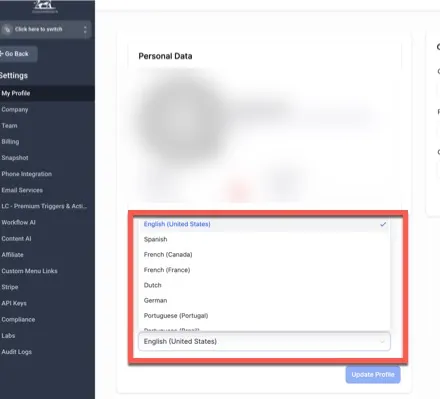
Set the language for all users under the agency profile:
Go to Agency View > Settings > Company > Profile
Select your preferred language (e.g., English, Spanish, French)
This will apply across all sub-accounts if you’re logged in as an agency user.
🧑💼 Sub-Account Language Setting
Go to Sub-Account > Settings > Business Profile
Choose a local language specific to that client or region.
✅ Pro Tip: A Spanish-speaking client? Set their sub-account to Spanish for a localized interface.
💬 Customizing Chat Widgets for Different Languages
The Live Chat Widget is your first impression—make it count in the right language.
📝 Steps to Customize:
Go to Sites > Chat Widget
Choose the widget you’d like to edit
Translate:
Welcome message
Button label (e.g., “Send” → “Enviar”)
Title and intro text
🛑 Note: The language dropdown setting doesn’t auto-translate; use manual translations.
✅ Best Practice
Create separate widgets for each language and assign them to specific funnels or regions.
🤖 Enabling Multi-Language Support in Conversation AI
🔧 Setup Steps:
Go to Sub-Account > Settings > Conversation AI
Open or create your bot in the Bot Goals section
- In Rules to Follow, add a line like:
* All responses should be in French.
🎭 Customize Your Bot’s Personality
n Configure Intent > Edit Prompt, define:
Who the bot is (e.g., a friendly Spanish-speaking assistant)
What it does (e.g., book appointments, answer service questions)
Any other helpful context (e.g., location details, opening hours)
✅ Example:
“You are a helpful AI assistant who only speaks Spanish and helps users book appointments.”
🎙️ Voice AI Language Settings
Voice AI enables your AI agent to answer calls in different languages. Perfect for multilingual support lines.
🛠️ How to Set It:
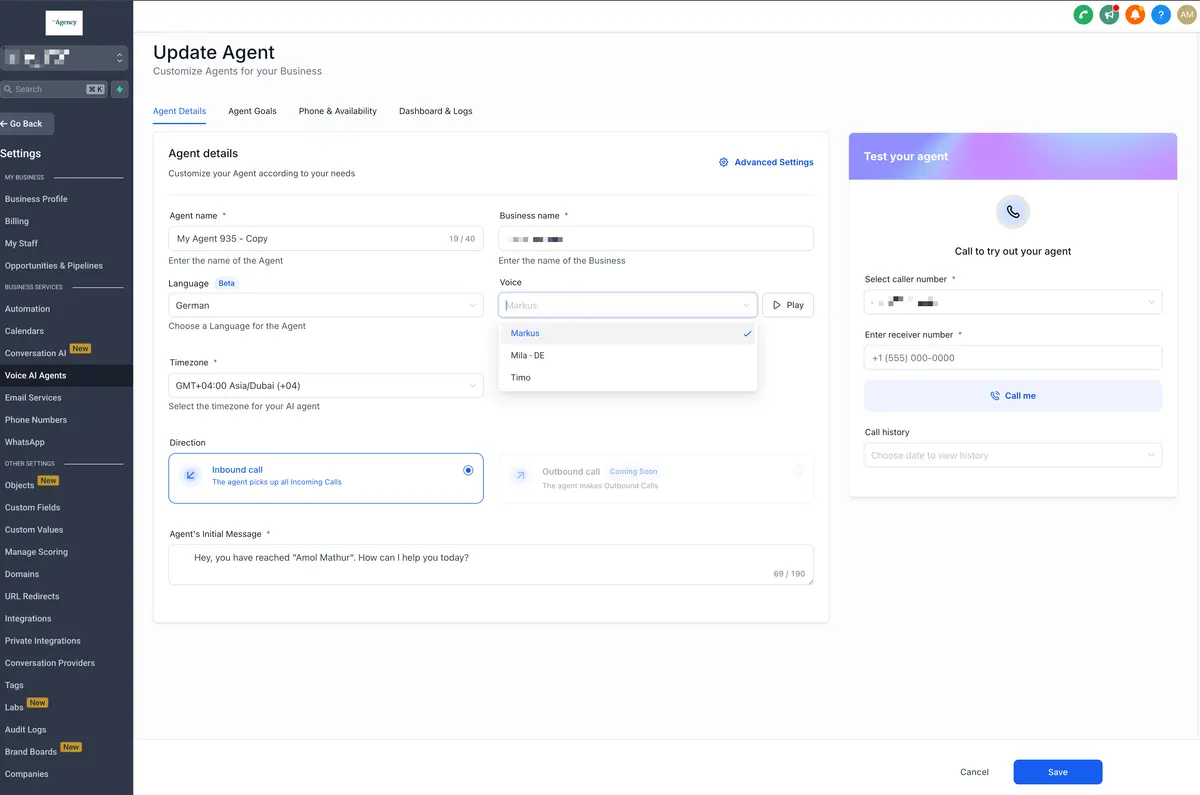
Go to Settings > AI Agents (Voice AI)
Choose your agent
Under Voice Settings, select the preferred language
Update the initial greeting to match the language
🛑 Beta Alert: Switching between languages mid-call can cause glitches—test carefully.
🎙️ Voice AI Language Settings
| Feature | Pay-As-You-Go | Unlimited Plan |
|---|---|---|
| Conversation AI | $0.02/message | Included in $97/month AI Employee Plan |
| Voice AI | $0.13/minute | Included in $97/month AI Employee Plan |
| Content AI | $0.09/1,000 words | Included in AI Employee Plan |
| Review AI | $0.08/review | Included in AI Employee Plan |
| Chat Widget | Free (manual translations) | N/A |
📌 The $97 AI Employee plan unlocks unlimited usage across all AI features, including multilingual capabilities.
Conclusion
HighLevel AI is already a powerful tool—but when paired with multi-language support, it becomes a global business solution. Whether you’re serving clients across borders or supporting local communities in their preferred language, HighLevel has the tools to help you connect.
With a little setup, you can create a seamless, personalized experience for every user—regardless of what language they speak.
Quick answers
Frequently asked questions
Can one bot switch between languages automatically?
Not yet. You need separate bots or instructions in different languages.
Does Conversation AI understand input in French, Spanish, etc.?
Yes, but it works best when you prompt it to use a specific language.
Are Voice AI and Conversation AI linked in language settings?
No. They’re configured separately—for now.
Is there an auto-translate feature for responses?
No. Manual translation or language-specific bot instructions are required.
Where this leaves you
Skip the build. Import a working GoHighLevel account instead.
Everything above is buildable by hand, and most people never finish. A snapshot is the same setup already made: funnels, pipelines, calendars, the prebuilt website and the automations, written for one industry and wired together before it reaches you.
- Delivered within 24 hours by email
- Install on unlimited sub-accounts you manage
- 20 hours of setup help across 15 days
Keep reading
All articles
GoHighLevel Adds Facebook, Instagram & Voice AI to All-in-One Chat Widget
Communication today happens everywhere. Customers message through Facebook, reply on Instagram, chat via SMS, leave WhatsApp messages, and increasingly rely
December 5, 20255 min read
AI Employee Overview: Automate Smarter with HighLevel’s AI Suite
Imagine hiring a smart digital assistant that never sleeps, answers calls, handles messages, writes content, manages reviews, and even automates
July 31, 20254 min read
Generate and Edit Images with Ask AI in GoHighLevel
Creating high-converting visuals shouldn’t require a design degree or expensive software. Whether you’re building landing pages, sending email campaigns, or
July 28, 20255 min read