



Top 5 AI Automation Tools in GoHighLevel You’re Not Using Yet
If you’re using GoHighLevel for funnels, pipelines, and automations—you’re only scratching the surface. What truly sets HighLevel apart in 2025
Contents
If you’re using GoHighLevel for funnels, pipelines, and automations—you’re only scratching the surface. What truly sets HighLevel apart in 2025 is its AI automation power. Yet, many users don’t realize just how deeply AI is integrated into the platform—and how much it can do without adding more work.
In this article, we’ll explore 5 powerful AI Automation tools inside GoHighLevel that are often underutilized but can completely change how you serve clients, run your business, and scale your time.
🚀 Key Takeaways
- Unlock hidden automation potential with AI-driven tools.
- Learn to implement Conversation AI, Workflow AI, Content AI, and more.
- Use practical, step-by-step setups for each tool.
- Rebill clients for AI usage and increase profit with SaaS.
- Save time on content, customer service, and reviews—without hiring.
1. Conversation AI Bot
Overview
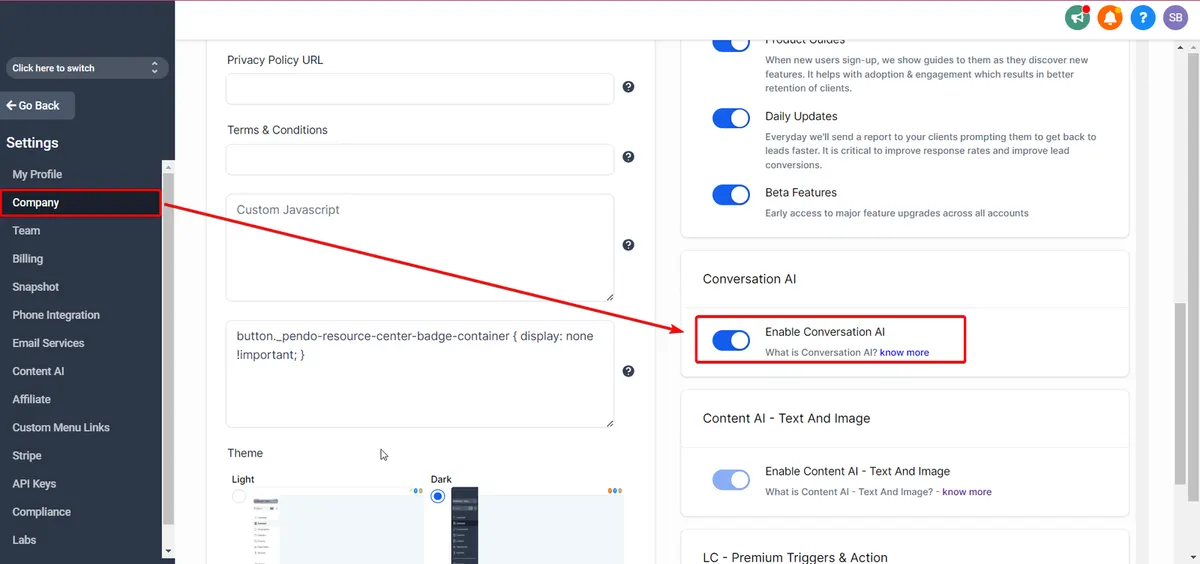
Conversation AI acts as a smart virtual assistant for your leads, responding automatically through multiple channels like SMS, Facebook Messenger, Instagram DMs, Google Business Chat, and webchat.
It handles:
- FAQs
- Appointment bookings
- Dynamic intent switching
- Multi-channel support
Features Table
| Feature | Description |
|---|---|
| Modes | Off, Suggestive, Auto-Pilot |
| Channels Supported | SMS, FB, IG, Webchat, Google Business, Live Chat |
| Intent | General Q&A, Appointment Booking |
| Training Options | URLs, Q&A Pairs |
| Testing Tools | “Bot Trial” inside settings |
Real-World Use Case
A medspa owner used Auto-Pilot mode to respond to over 200 Instagram DMs monthly. The AI handled appointment bookings and reschedules and answered skincare FAQs—saving 15+ hours a week.
Step-by-Step Setup
- Go to Settings → Conversation AI
- Choose channels
- Add training via links or Q&A.
- Select intent (General / Appointment)
- Toggle mode: Suggestive or Auto-Pilot
- Use the Bot Trial tab to preview and fine-tune
Pricing Breakdown
| Plan Option | Cost |
|---|---|
| Pay-as-you-go | $0.02 per message |
| AI Employee Unlimited | Included in $97/mo |
🔗 Conversation AI Bot Setup Guide
2. Workflow AI
Overview
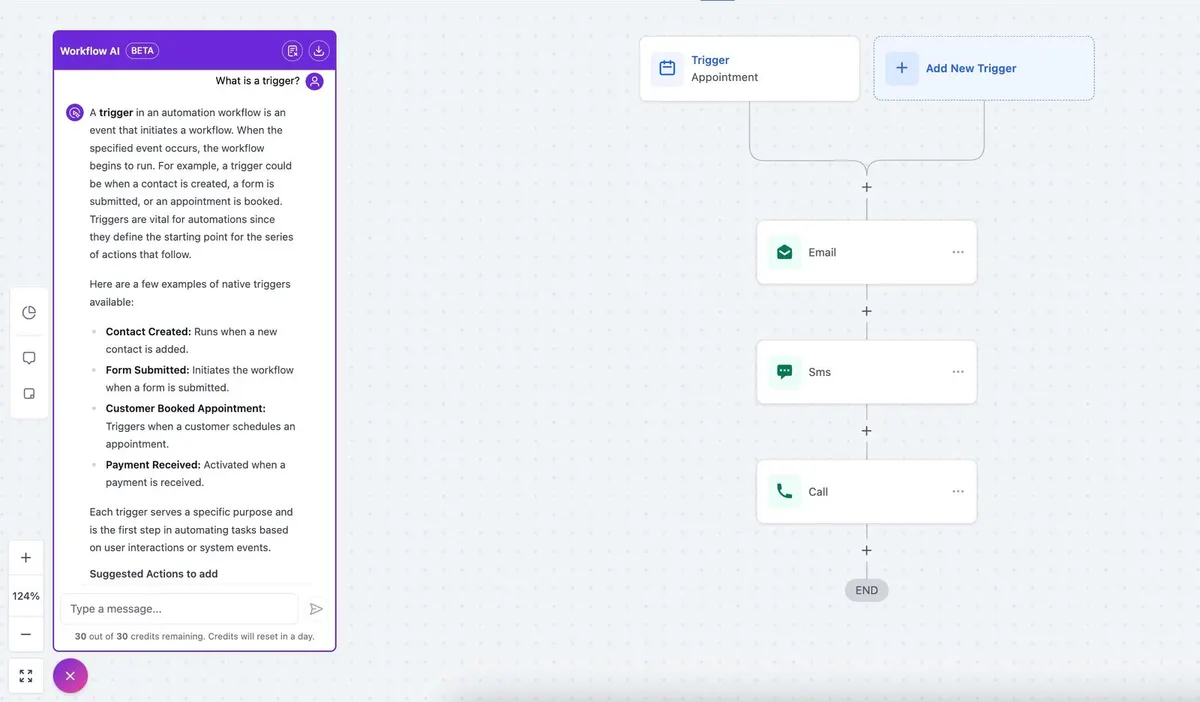
Workflow AI allows you to add dynamic AI-generated responses or decisions inside GHL workflows. Think ChatGPT inside your automation builder.
Ideal for:
- Smart follow-ups
- Email personalization
- Summarizing long-form inputs
- Lead qualification
Key Features Table
| Feature | Description |
|---|---|
| AI Prompt Action | Use ChatGPT-like prompts in any workflow |
| Merge Fields | Personalize AI prompts with contact-specific info |
| Context Handling | No memory—must include prior info in the prompt |
Step-by-Step Setup
- Go to Automation > Workflows
- Click + → Add Action → AI Prompt
- Enter a prompt like:
“Summarize this lead’s message and reply in a friendly tone using {{contact.first_name}}.”
4. Chain the next action (send SMS, email, update tag)
Example
A fitness coach uses Workflow AI to summarise client check-ins and draft the feedback email automatically, so the coach edits a draft instead of writing from scratch.
Pricing Table
| Plan | Cost |
|---|---|
| Pay-as-you-go | Based on token usage |
| AI Employee Plan | Included in $97/month |
| Rebilling Available | Yes (on $497 SaaS plan) |
3. Content AI
Overview
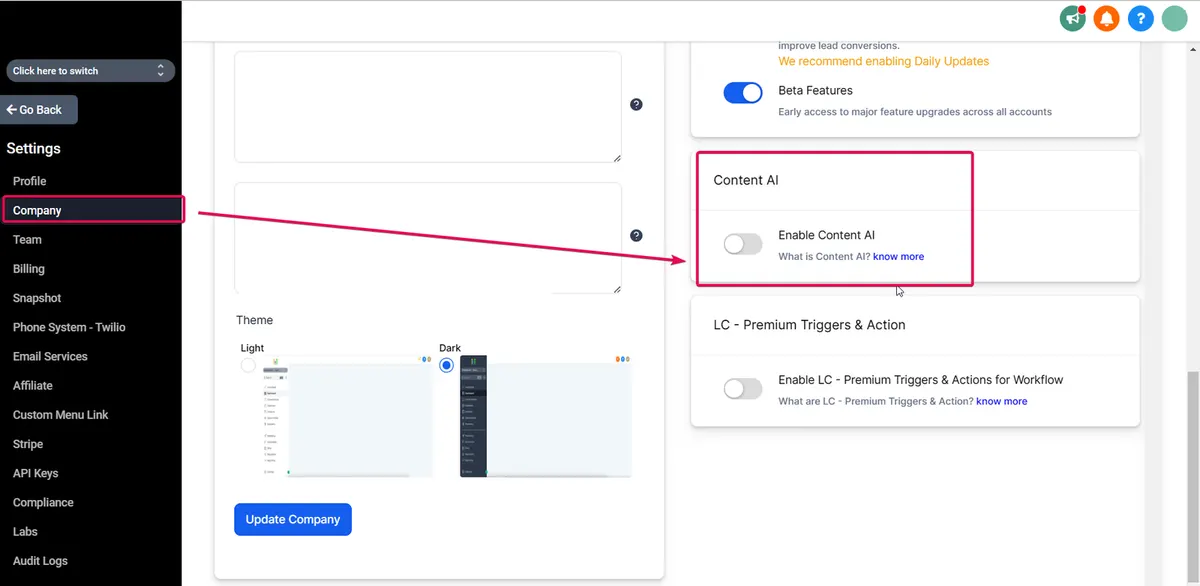
Content AI is your built-in writer for:
- Blogs
- Emails
- Instagram captions
- Landing page copy
- Google posts
You simply give it a prompt, and it does the rest.
Use Locations
- Social Planner
- Email Builder
- Funnels/Sites
- Blog Editor
Content AI Table
| Use Case | Output Example |
|---|---|
| Instagram Captions | “Top 3 Tips for Clear Skin + CTA” |
| Blog Generation | “How to Scale a Coaching Business in 2025” |
| Website Headlines | “Fast, Friendly, and Focused on Results” |
Steps to Use
- Open content tool (email, blog, etc.)
- Click the AI button or “Generate with AI.”
- Enter topic and tone
- Tweak and save
Pricing
| Plan Type | Cost |
|---|---|
| Pay-as-you-go | $0.09 per 100 words |
| AI Employee Plan | Unlimited with $97/month |
4. Reviews AI
Overview
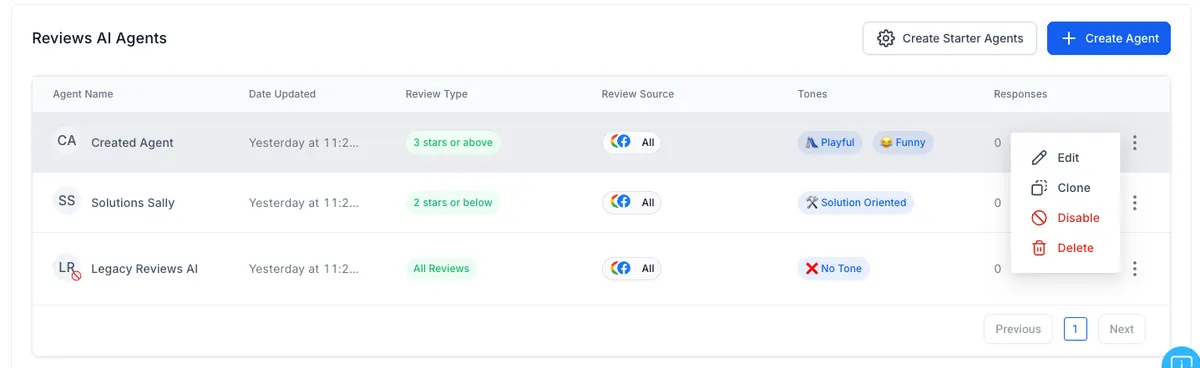
Review replies are vital—but can be tedious. Reviews AI auto-generates responses to Google and Facebook reviews directly in GHL’s Reputation tab.
Modes
- Suggestive – AI writes a draft, you approve
- Auto-Pilot—AI sends the reply automatically
Reviews AI Table
| Feature | Description |
|---|---|
| Source Platforms | Google, Facebook |
| Tone | Editable via prompt settings |
| Workflow Triggers | Tag-based (for negative reviews, etc.) |
Use Case
A restaurant uses Auto-Pilot mode to respond instantly to all positive reviews and sends alerts for negative ones. Net result? Boosted 4.1 rating to 4.7 in 90 days.
Pricing
| Plan Option | Cost |
|---|---|
| Pay-as-you-go | $0.08 per review |
| AI Employee Plan | Included |
5. AI Employee Plan
Overview
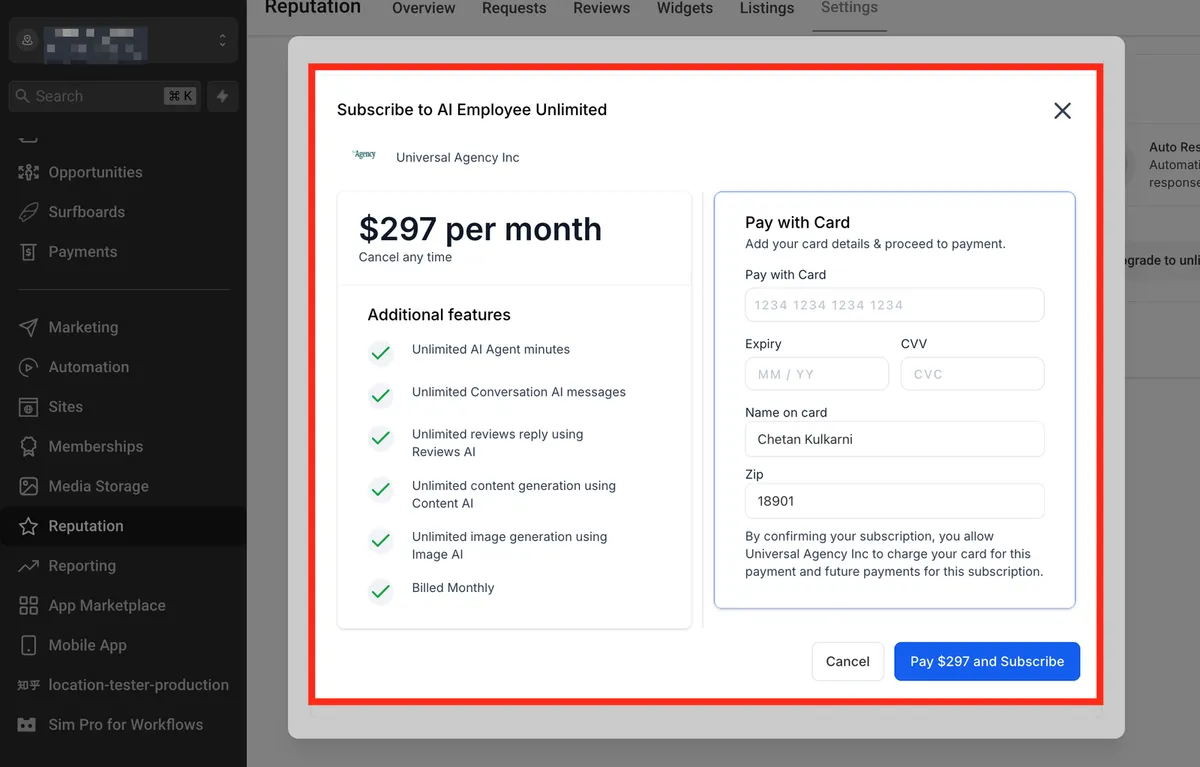
This all-in-one plan includes unlimited usage of all AI tools inside GoHighLevel at a fixed monthly price.
Included Tools
✅ Conversational AI
✅ Workflow AI
✅ Content AI
✅ Voice AI (in rollout stages)
Why Use It?
If you use 3+ tools or serve multiple sub-accounts, this plan:
- Saves money vs per-use fees
- Simplifies rebilling to clients
- Unlocks the full AI toolbox
AI Employee Plan Pricing Table
| AI Tool | Pay-As-You-Go Price | AI Employee Unlimited Plan |
|---|---|---|
| Conversation AI | $0.02/message | Included |
| Content AI | $0.09/100 words | Included |
| Reviews AI | $0.08/review | Included |
| Voice AI | $0.13/min (calls) | Included |
| Plan Price | Variable per use | $97/month flat |
Conclusion
Whether you’re running an agency, selling digital products, or managing local businesses—GoHighLevel’s AI features can save hours, improve response time, and even create new revenue streams. Most importantly? They’re sitting right inside your dashboard, ready to be switched on.
Stop doing it all manually. Start scaling with AI.
Master GoHighLevel AI Tools in 7 Days
Join our step-by-step course to unlock the full potential of AI automation — no tech skills needed. 🎓 Learn. Automate. Scale.
Book Your DemoQuick answers
Frequently asked questions
Do I need a special plan to access AI tools in GoHighLevel?
All users can access AI features on a pay-per-use basis. For unlimited usage, opt into the AI Employee Plan.
Can I rebill AI usage to my clients?
Yes, on the $497 SaaS plan, you can rebill AI usage (even mark it up).
Is Conversation AI different from Workflow AI?
Yes. Conversation AI works like a live chatbot. Workflow AI is prompt-based and fits into automations.
How do I test AI before going live?
Use the “Bot Trial” tab in Conversation AI and test Workflow AI by triggering test workflows.
Is AI reliable for client-facing content?
Yes, especially after training and testing. You can monitor feedback and refine prompts easily.
Where this leaves you
Skip the build. Import a working GoHighLevel account instead.
Everything above is buildable by hand, and most people never finish. A snapshot is the same setup already made: funnels, pipelines, calendars, the prebuilt website and the automations, written for one industry and wired together before it reaches you.
- Delivered within 24 hours by email
- Install on unlimited sub-accounts you manage
- 20 hours of setup help across 15 days
Keep reading
All articles
Conversation AI Summary and Transcript Feature Guide
If you’re using Conversation AI to handle customer interactions, you’re already ahead of the game. But what if you could
February 12, 20265 min read
GoHighLevel Voice AI vs Vapi & Air.ai
Why Agencies Are Choosing the All-in-One AI Platform for 2026 With so many AI tools flooding the market in 2026,
February 2, 20264 min read
Video Testimonials Now Live in GoHighLevel
If you’ve been using GoHighLevel for managing customer reviews, you know how important it is to stand out in today’s
November 26, 20256 min read